The Smart Progression Engine: AI That Thinks in Training Blocks
BuildStability's Smart Progression Engine reads each client's last training block and generates the next one in seconds. Smart Bulk Push extends the same continuity across an entire client roster: edit one template, push to forty clients, each one adapted for deload status, equipment, and injuries. The trainer approves every change.
The Feature That Changes How You Program
Every trainer knows the friction of Sunday night programming. You have 20 clients finishing their 4-week blocks. You need to open their current program, see what weights they hit in Week 4, open a new tab, create a new template, and manually calculate their next phase. It's tedious, error-prone, and eats hours of your weekend.
The Smart Progression Engine reduces a lot of the friction.
It's not just a "workout generator." It's a continuity engine. It reads the history of what your client just did, exercises, volume, intensity and intelligently builds the next 4-6 weeks to keep them moving forward. You get the precision of hand reviewed programming with the speed of AI.
What the Progression Engine Does
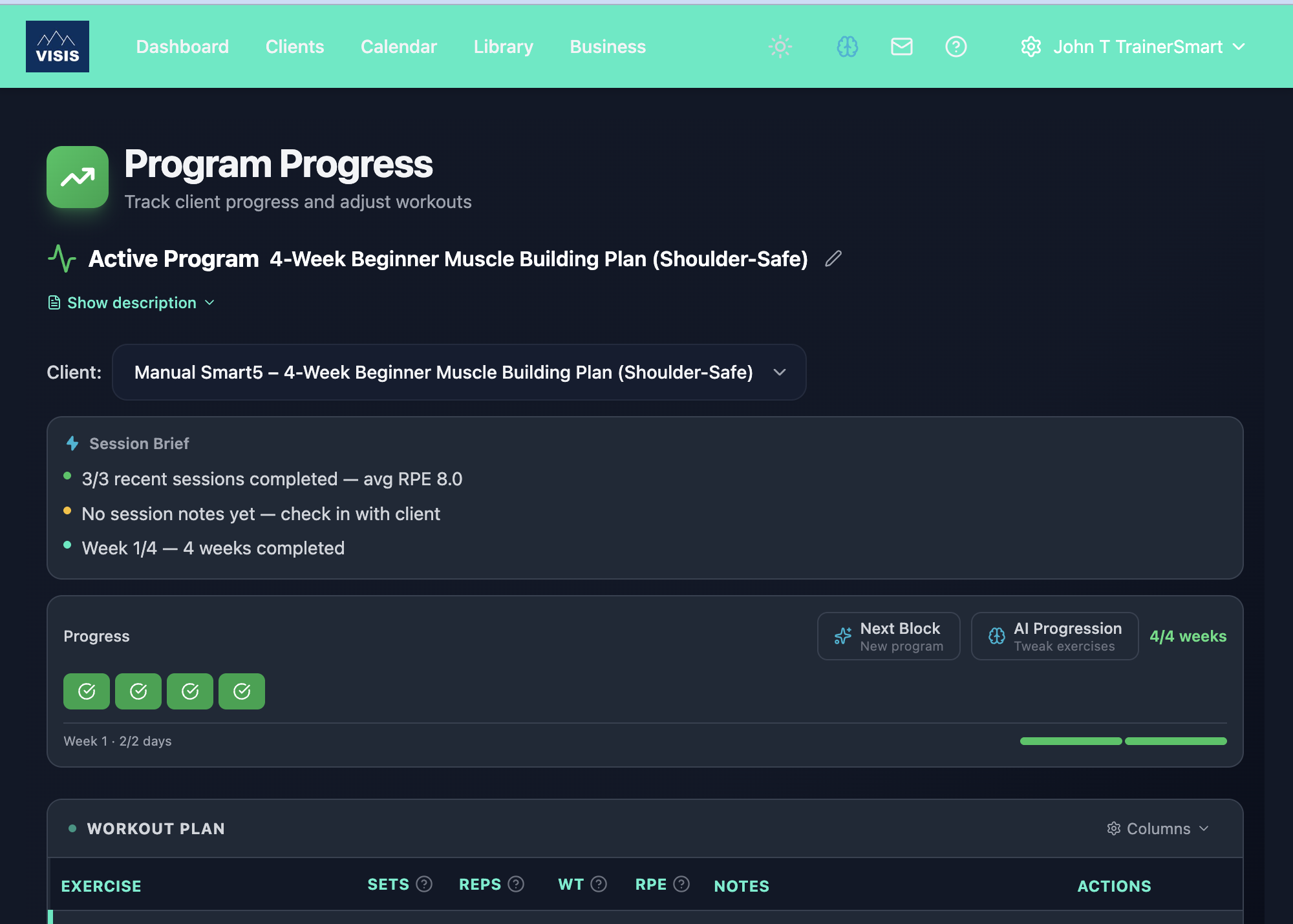
Your client finishes a 4-week training block; with one click, the AI generates the next block picking up exactly where they left off.
No re-entering exercises. No scrolling through last week's spreadsheet to figure out where they were at. No starting from scratch every mesocycle.
The system reads the last week of the completed program (exercises, sets, reps, RPE targets) and uses that as the starting point for the next block. Progressive overload is baked in. If your client was squatting 3x8 at RPE 7, the next block picks that up and progresses it appropriately.
Client Data Flows Into Every Generation
This matters most from a safety and quality standpoint.
When you hit "End of block", the generation modal automatically pre-fills your client's:
- Age (calculated from their date of birth)
- Sex (from their profile)
- Shared notes and medical documents on file
These aren't labelled "optional." They're labelled "Recommended for appropriate programming" because that's what they are. A 22-year-old male and a 58-year-old female should not get the same intensity prescription. Age and sex influence exercise selection, loading parameters, recovery recommendations, and exercise suitability.
If a client's age or sex is missing from their profile, you'll see an amber warning in the modal. We want you to fill it in for your client's benefit.
Three Progression Styles (You Probably Only Need One)
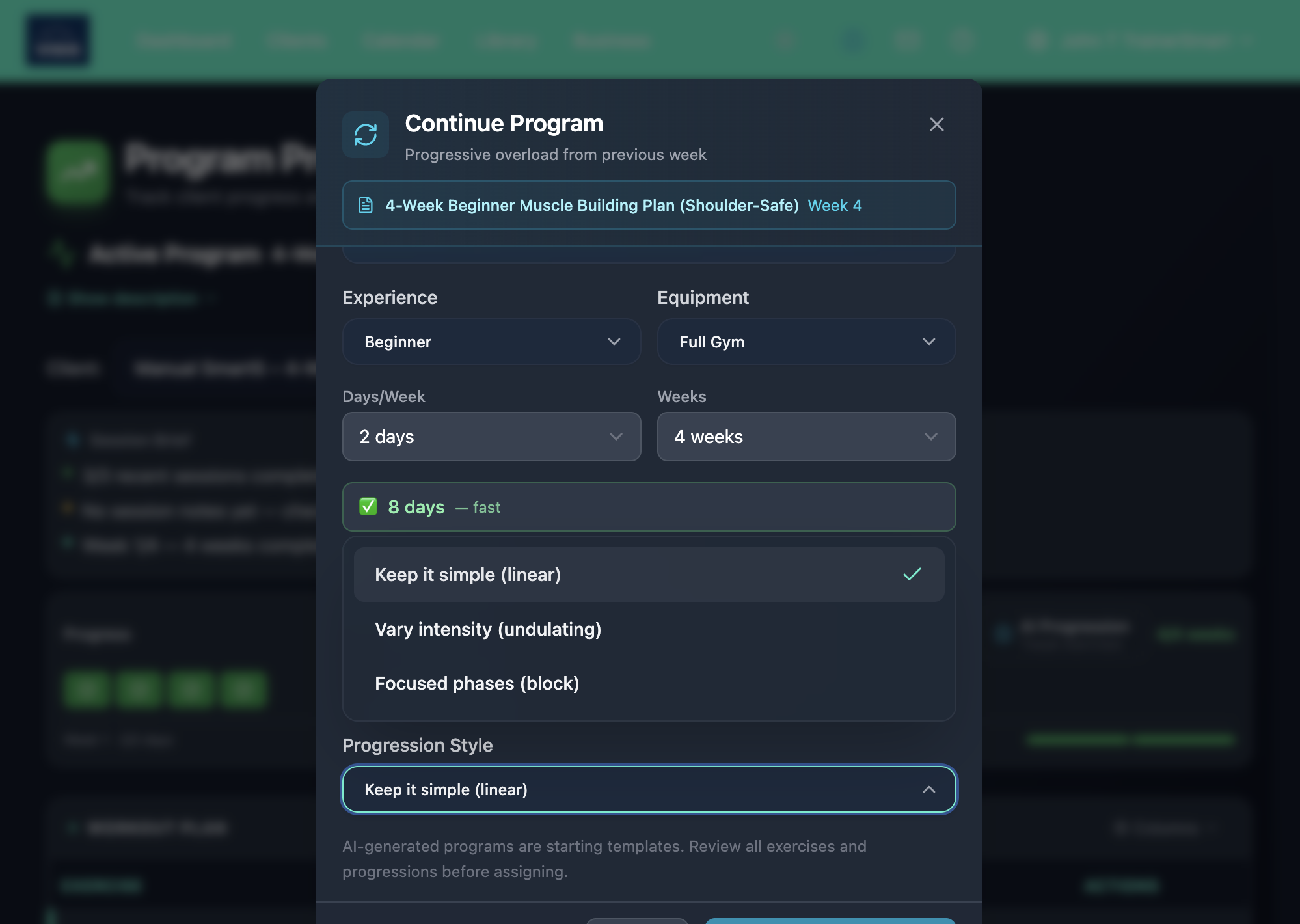
Under "Advanced Options" in the generation modal, there's a progression style selector:
Keep It Simple (Default)
Steady, week-to-week progression. Add a bit of weight, add a rep, move forward. This is what 80% of trainers do naturally, and it works for the vast majority of clients. If you never touch this setting, you're doing it right.
Vary Intensity Week to Week
Alternates between heavier and lighter weeks. Think heavy Monday, moderate Wednesday, light Friday, but applied across the whole mesocycle. Useful for intermediate clients who've stopped responding to straight-line progression, or clients who need more recovery management.
Focused Training Phases
Distinct blocks with different training goals. Weeks 1-3 might focus on volume accumulation. Weeks 4-6 shift to intensity. This is real periodization, useful for competitive athletes, powerlifters, or clients training for a specific event.
Most trainers will never open Advanced Options. The default is the right choice for most clients. When you need the control, it's there.
Recovery Weeks Are Built In
The "Include Recovery Week" toggle adds an automatic deload. Volume drops by 40-50%. Intensity drops to RPE 5-6. Same exercises, fewer sets. On a program longer than four weeks the deload repeats every fourth week rather than landing only at the end. It's on by default for any program of 4 or more weeks.
Every good coach programs deloads. Now the AI does it for you.
You Review Everything
The AI generates a draft. You review it, edit it, then assign it.
AI-generated programs are starting drafts — always review and adjust before assigning to clients. The trainer is the qualified professional. You control exercise selection, intensity decisions, and client-specific adjustments. The AI handles the tedious formatting, progressive overload math, and template structure.
Nothing is auto-assigned. Nothing bypasses your judgement. The program opens in the full Program Builder where you can modify every exercise, set, rep, and note before your client ever sees it.
Save & Assign in One Click
Once you're happy with the generated program, "Save & Assign" does three things at once:
1. Saves the program as a reusable template
2. Creates a new assignment for the client
3. Automatically completes the previous assignment
No more juggling multiple screens. No more forgetting to close out the old program. One click, and your client's training continuity is seamless.
Chain Blocks Indefinitely
The real power is chaining. Run a 4-week strength block. Continue into a 4-week hypertrophy block. Continue into a 4-week peak. Each block uses the previous one as context. Each block gets its own progression style if you want it.
You're not limited to one long program. You're building a training journey, one block at a time, the same way good coaches periodize in practice.
From One Client to Forty: Smart Bulk Push
Everything above describes how the engine handles a single client. The next problem most trainers run into is volume. You've got forty active clients on programmed training. Half of them just finished a block. Some are deloading. Three don't have a squat rack at home. Two have shoulder injuries that mean you avoid OHP.
The old way: open each client, run "Continue Program," handle their per-client adjustments manually. Three to four hours, every Sunday.
Smart Bulk Push is the same engine, scaled to the roster. You edit a template once, push the change to your active client list, and the engine reasons per client:
- Defers it for clients in deload. Their current block isn't finished. The change waits.
- Swaps the lift if their gym does not have it. Equipment lookup runs against each client's setup.
- Skips clients with relevant injury notes. A press progression pauses for the trainee with the shoulder note.
- Applies the rest as proposed. The clients in mid-block on standard equipment with no flagged injuries get the change as you wrote it.
The output is a two-step review. Step 1 shows what changed at a glance: a Before/After table grouped by session, the count of affected active clients, and a toggle to include clients on a REPley-personalised version of the plan. Click forward.
Step 2 is the per-client review. You see something like:
47 active clients. 3 reviewed by REPley (injury notes flagged). 5 need an equipment swap. 8 in deload, held until next block. 31 ready to apply.
The buckets are stacked top-down by attention-needed, so the cases that need your judgement land first. Every client row is expandable. Click any row and you see exactly what prescription will land for them, plus — for the REPley-evaluated bucket — the AI's reasoning text. Example: "I reduced the volume to 3×10 because Sarah's shoulder note flagged a recent flare-up." Clients on a personalised version of the plan get a small badge next to their name so you can tell them apart from the baseline cohort without expanding.
You approve the buckets, override individual clients, or chat with the engine to refine ("skip Marcus too, acute injury this week"). A back button at step 2 returns you to the change preview if you want to revisit a decision before committing. Nothing writes until you say so.
This is the part that makes the AI promise real at scale. Without it, AI-generated programming saves you ten minutes per client. With it, you can run a roster of 40 with the per-client attention you'd give a roster of 5.
The engine respects the same rules as single-client progression: every change waits for your approval, every adaptation comes with a reason that's visible inline (not buried in an audit log), and the version history captures what the plan was, what it became, and why. The line between "fast" and "automatic" stays where you draw it.
The Time Savings Are Real
Here's what this replaces in your weekly workflow:
- Opening last week's program to review where the client ended: Gone. The AI reads it.
- Manually calculating progressive overload across 15-20 exercises: Gone. The AI applies evidence-based progressions.
- Creating a new template from scratch for the next block: Gone. One click.
- Assigning the new program and closing the old one: Gone. Save & Assign handles it.
- Repeating that loop forty times when a roster's blocks all roll over together: Gone. Smart Bulk Push handles the cohort. You handle the exceptions.
Conservative estimate: 2-3 hours per week saved for a trainer with 20+ clients on programmed training, scaling toward 4-5 hours for trainers running rosters of 40+ where Smart Bulk Push really earns its keep. That's a working day every week back. You can spend it coaching. Or you can spend it not working on a Sunday night.
Built for Trainers, Not Replaced by AI
The progression engine doesn't replace your expertise. It automates the repetitive parts so you can focus on the decisions that require a qualified coach: exercise modifications for injuries, psychological pacing for motivation, and the hundred small adjustments you make because you know your client.
The AI is fast at math and pattern recognition. You're irreplaceable at coaching. This tool lets both do what they're best at.
Frequently Asked Questions
What is the BuildStability Smart Progression Engine?
The Smart Progression Engine is the part of BuildStability that reads what your client actually logged in their last block, the last five sessions for each movement including the load lifted and the effort reported, and writes the next block of progressive overload from those numbers in seconds. It reads the trend rather than just the last number: a lift getting harder at the same weight is held rather than pushed. The trainer reviews and edits the generated block in the full Program Builder before assigning. Nothing is auto-assigned. The AI handles the tedious math; the coach controls every decision.
How does Smart Bulk Push differ from copy-paste templates?
Copy-paste templates give every client the same change. Smart Bulk Push reasons per client. When you push a template change to your active client list, the engine defers the change for clients in deload, swaps the lift if their gym does not have it, skips clients with relevant injury notes, and applies the rest. The trainer sees a two-step review: step 1 shows a Before/After diff grouped by session, step 2 shows clients in bucketed sections sorted by attention-needed (Reviewed by REPley, Equipment swap, Hold until next block, Ready to apply). Every client row is expandable: click and you see the exact prescription that will land plus, for AI-evaluated rows, REPley's reasoning text. Personalised-version clients get a badge so you spot them at a glance. It is the difference between mass programming and personal programming at scale.
Can I run forty clients with personalised programming using BuildStability?
Yes. The AI program builder personalises the first plan per client, the Smart Progression Engine personalises the next block, and Smart Bulk Push personalises the cohort updates. The same approval mechanic runs through all three: every change waits for the trainer's review. Trainers running rosters of 40+ clients on programmed training save 4-5 hours per week without giving up the per-client attention that earned them those clients.
How do you check an AI-generated program before the trainer sees it?
Before any change ships to how programs are built, BuildStability generates real programs across six goal types and checks them against a fixed set of structural rules: that a long program reads as real training blocks rather than one week repeated, that recovery weeks are measurably lighter than the block they close, that the program trains the goal on its label (a fat loss block carries conditioning in every session, a strength block covers squat, hinge, push, pull and carry patterns), and that equipment limits, exclusions and injury flags are honoured after generation rather than merely requested. These are our own standards, not an external accreditation. They catch structure, not suitability: they confirm conditioning is present in a fat loss block, not whether steady rowing or hard intervals is right for the client in front of you. That is coaching, and it stays with the trainer.
Does AI programming replace trainers?
No. The AI generates drafts and applies progressive overload math; the trainer decides exercise selection, intensity, and client-specific adjustments. Every change waits for trainer approval. The version history shows what the plan was, what it became, and why. Trainers who use AI to handle the formatting and progression math report more energy for the coaching work that actually requires a qualified human: psychological pacing, motivation, and exercise modification for individual constraints.
How does the Smart Progression Engine handle deload weeks?
The "Include Recovery Week" toggle (available from three weeks up) adds an automatic deload. On a program longer than four weeks it repeats every fourth week rather than landing only at the end. Volume drops by 40-50%. Intensity drops to RPE 5-6. Same exercises, fewer sets. Smart Bulk Push respects deload status: if a client is currently in their deload week, a template push gets deferred for them until the next block, not applied mid-recovery.
Is BuildStability's AI programming evidence-based?
The progression rules used by the Smart Progression Engine apply standard evidence-based principles: RPE-aware progressive overload (RPE 6-7 progress, RPE 7-8 maintain, RPE 8+ hold or deload), age and sex-appropriate intensity (the modal pre-fills client age and sex from their profile and warns if either is missing), and equipment-aware exercise selection. The trainer reviews and adjusts before any client receives the program.
Ready to automate your training business?
Start your 14-day free trial. No credit card required.
Start Free Trial