REPley writes the programming.
You make it great.
Progress a client in one tap with a rule that knows a barbell from a band, or hand the whole block to REPley, the AI assistant built into BuildStability. You pick which, every time, and you review every change.
Two Ways To Progress A Client Program
One tap when you are on the floor with a client waiting. A conversation when the block needs a rethink. Both show you the change before it writes, and both undo.
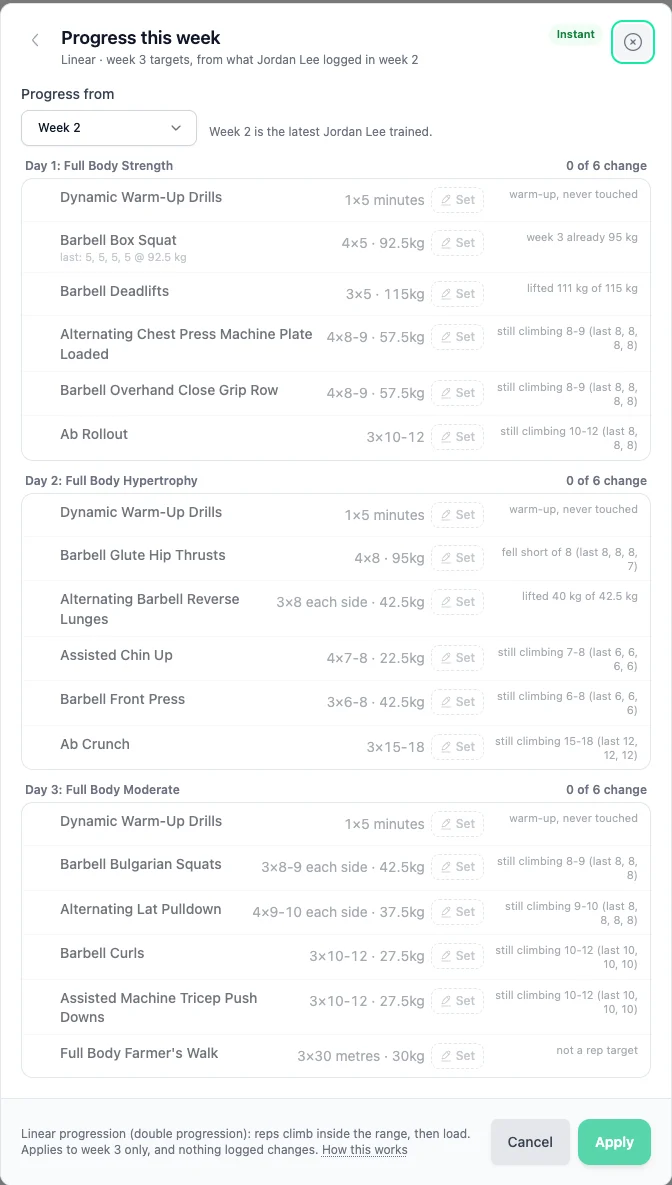
Instant progression
Done before your client re-racks the bar
One tap reads what you prescribed and what they actually lifted, then writes next week. It knows the kit: a barbell moves by a plate pair, a dumbbell by a kilo, a kettlebell to the next real bell, a machine by one stack plate. This is a rule you can read, not a guess, and it gives you the same answer every time.
- Reps climb inside your range first, then load, then reps reset
- Push-ups, planks and band work progress on reps, never on a weight we made up
- Change any row yourself, or leave it, before anything is written
- Extend the block in place, or start a fresh one
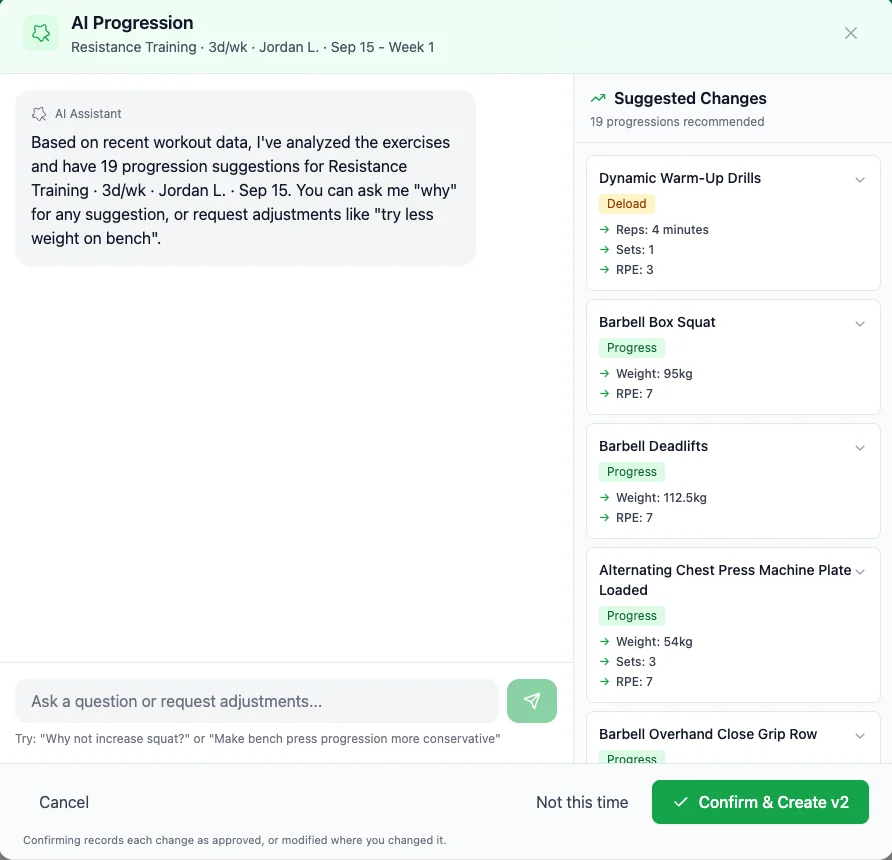
Ask REPley
For when the block needs a rethink, not a nudge
REPley reads the effort your client reported, the notes you left and the shape of the whole block, then proposes the rest of it. Ask why it called a deload, swap an exercise around a cranky shoulder, or tell it to go easier. It answers, and you decide.
- Keep it simple (linear), vary intensity (undulating) or focused phases (block)
- Reads RPE, session notes and the last five sessions per movement
- Talk it through before you apply a thing
- Saves a new version, keeps the old one, included on every plan
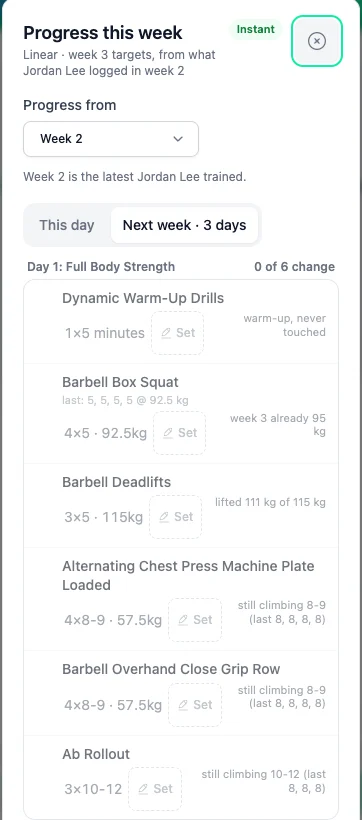
It fits in one hand. The same preview, the same overrule, the same undo on a phone at the rack, an iPad on the desk or a laptop at home. Same preview, same undo, whichever you pick. Every plan gets both.
Three Ways To Progress With AI
When you want REPley on it rather than the instant rule, there are three ways in.
New Program
Build from scratch in 60 seconds
Tell REPley the client's goal, experience level, available equipment, and training frequency. It writes a periodised program with progressive overload built in, and checks its own structure before you see it.
- Set sport, goal & training days
- REPley writes periodised blocks
- Warm-ups, rest periods & tempo included
- Edit any exercise before assigning
End of Block
Continue from the current program
When a client finishes a block, tap "End of block". It reads the last five logged sessions for every movement, including the load lifted and the effort reported, then writes the next block from those numbers.
- Available throughout the program, you decide when the block is done
- Carries forward exercises & progression
- Progresses from the load and RPE they logged
- Creates a new program version you can review
Progression Chat
Fine-tune exercises in conversation
Open any assigned program and ask REPley to analyse it. It reviews the last 5 sessions of data (RPE, volume and load trends), then suggests specific adjustments you can discuss before applying.
- Weight increases based on RPE trends
- Deload recommendations when needed
- Exercise swaps for plateaus or injuries
- Volume adjustments backed by session data
What REPley Reads
Every suggestion REPley makes comes from your client's logged sessions, not from a population average.
RPE Trends
If RPE is consistently low, it suggests progression. Consistently high? Time for a deload.
Load History
Tracks weight lifted across sessions. Identifies stalls and recommends adjustments.
Volume Patterns
Monitors total sets and reps. Flags when volume needs to increase or pull back.
Session Frequency
Accounts for missed sessions and irregular training when making suggestions.
REPley assists. It never replaces you.
You are the expert. The AI handles the analysis and the structural checks so you can spend more time coaching and less time calculating. It knows what your client logged. You know your client.
What REPley does
- Reads logged load, reps and RPE across sessions
- Identifies when a client is ready to progress
- Flags when RPE suggests a deload is needed
- Drafts the program, then structure-checks its own work
- Tracks version history so nothing is lost
What you decide
- Whether to apply, modify, or reject any suggestion
- Which exercises to swap and what to replace them with
- When a client is actually ready for more volume
- How to adjust for injuries, preferences, or goals
- When to override the data with your coaching instinct
Checked before it reaches you.
Before any change ships to how programs are built, we generate real programs across six goal types and check them against a fixed set of structural rules. Our own standards, not an external accreditation.
It trains the goal on the label
A fat loss block carries conditioning in every session. A strength block covers squat, hinge, push, pull and carry.
Deloads are real deloads
A recovery week has to be measurably lighter than the block it closes, on volume and on intensity.
Blocks, not one week repeated
Phases have to change across a long program, and weekly volume is held against week one.
Your constraints are verified
Equipment limits, exclusions and injury flags are checked after generation, not just requested.
These checks catch structure, not suitability. They confirm conditioning is present in a fat loss block. They do not decide whether steady rowing or hard intervals is right for the client in front of you. They confirm a squat pattern is in a strength block, not whether it should be a front squat or a goblet squat for someone six weeks post-injury. That is coaching, and it stays yours. What we remove is the twenty minutes you would spend checking the draft for obvious holes.
How we check a generated programHow We Compare
Most fitness software restricts AI features to their most expensive tier. REPley is on every plan, from Essential up, and it writes real periodisation around your client's logged sessions rather than pulling from a generic template library.
Competitor comparisons based on publicly available information as of March 2026. Features and pricing may have changed since.
Common Questions
What is the difference between instant progression and asking REPley?
Is instant progression AI?
Does AI replace my programming decisions?
How do you check an AI-generated program is any good?
Why does it default to four-week blocks?
What data does the AI use to make suggestions?
Is AI progression available on all plans?
What is the difference between "New Program" and "End of block"?
Can I talk to the AI about its suggestions?
What happens to the old program when I apply changes?
Stop spending Sunday nights in spreadsheets.
REPley generates programs, continues training blocks from logged performance, and fine-tunes progressions, all from one place. You review every change before it reaches your client.
No credit card required · 14-day free trial · REPley included on every plan