You coach.
Everything else runs itself.
Programs, AI nutrition, scheduling, billing, check-ins, engagement tracking. Every feature on every plan. No add-ons, no commissions, no sales calls.

Three corners of the industry. One toolkit.
Every plan includes every feature. These are the three shapes of business that get the most out of it.
One trainer to a whole PT team.
Your first paying client through to a multi-trainer PT operation. In-person 1-on-1s, small groups, strength and conditioning, rehab programming. Scales from one coach on one subscription to a team of ten without per-trainer seat fees.
Semi-private, pods, small group.
Semi-private personal training, pod training and small group PT, plus the reformer, yoga and barre studios that run on capacity and waitlists. The whole pod on one Class Board: shared workout or their own program, waitlist that fills the spots, QR check-in at the door, every set logged on an iPad while they train.
Gyms, HYROX, boxing, MMA.
Independent gyms, HYROX training affiliates, boxing and MMA clubs, BJJ academies, CrossFit boxes, functional fitness gyms, dance schools, climbing gyms, multi-trainer operations. HYROX race prep with all 8 station exercises is built in.
Coaching has changed. Your software hasn’t. Until now.
Trainerize launched in 2013. ChatGPT in 2022. Every feature below was designed from the ground up for how you already work, so you spend more time coaching and less time learning software. A dozen things every trainer, studio, and gym fights with daily in their old software.
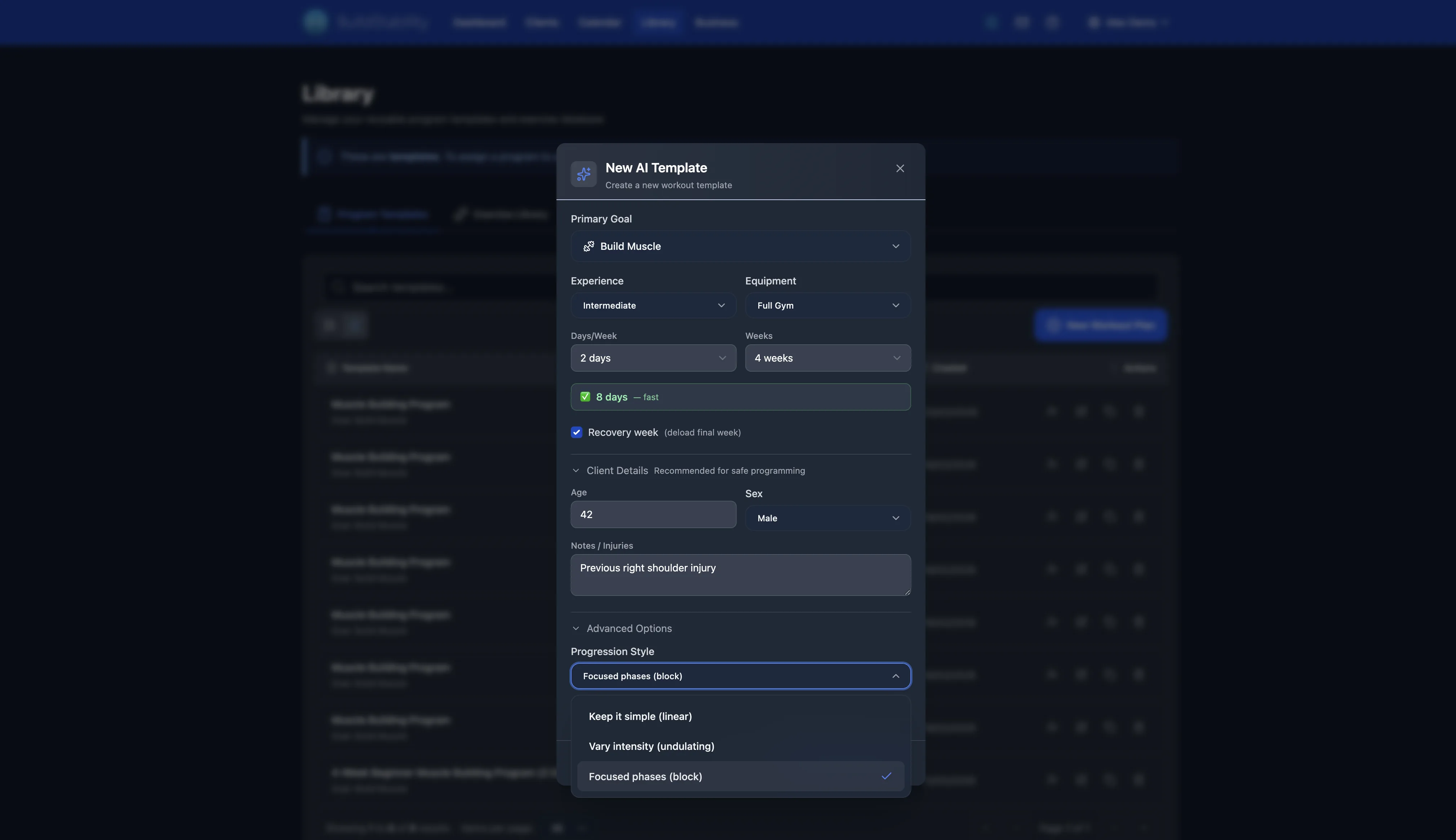
A program in seconds. Not Sundays.
Tell REPley about your client. A periodised block in 60 seconds, written from their actual history and built on the current research on volume, intensity and progression.
- Reads real history
Injury notes, RPE trends, last session’s actual load. Not a generic template, not a population average.
- Edits in-line
No PDF exports. No emailing the plan. No "did you get my program?" The client opens the app, the plan is there.
- Same builder, every sport
HYROX periodisation, healthy-ageing progressions, hybrid lifting, running base and riding days. One builder, every sport you coach.
Clients ride them in REPley Ride →


AI nutrition, built for the Australian shelf.
Macro targets, not rigid meal plans. Australian and NZ government food data, 4,300+ Coles and Woolworths products, plus Macca’s, GYG, KFC, Subway. Five logging methods.
- Five ways to log
Barcode, label photo, meal photo, chat with REPley, voice. Every method included on every paid tier.
- Targets, not menus
Macros adjust for training day vs rest day. Clients log what they ate, not what an app prescribed.
- Adherence, not raw logs
Fuel score, protein streak, where the week broke. The view your coaching actually uses.

Smart Habits: coaching the other 165 hours
REPley drafts up to three tiny daily habits per client, anchored to routines they already have. You approve. The app does the chasing.
- Built on published research
Anchored if-then plans roughly double follow-through in exercise studies. New habits take 66 days on average, not 21. The citations are in our habit-science guide, not hand-waved.
- Drafted, not guessed
Habits come from the program, nutrition targets, and goals you already hold. Thin file? REPley asks two quick multiple-choice questions first. Approve and assign in under a minute.
- Not another habit app
No second download, no separate subscription. Habits live beside the program and nutrition in your branded app, injury flags are respected, and you see compliance, not raw ticks.
Drafted from her program and goals. If the file is thin, REPley asks two quick questions instead of guessing.
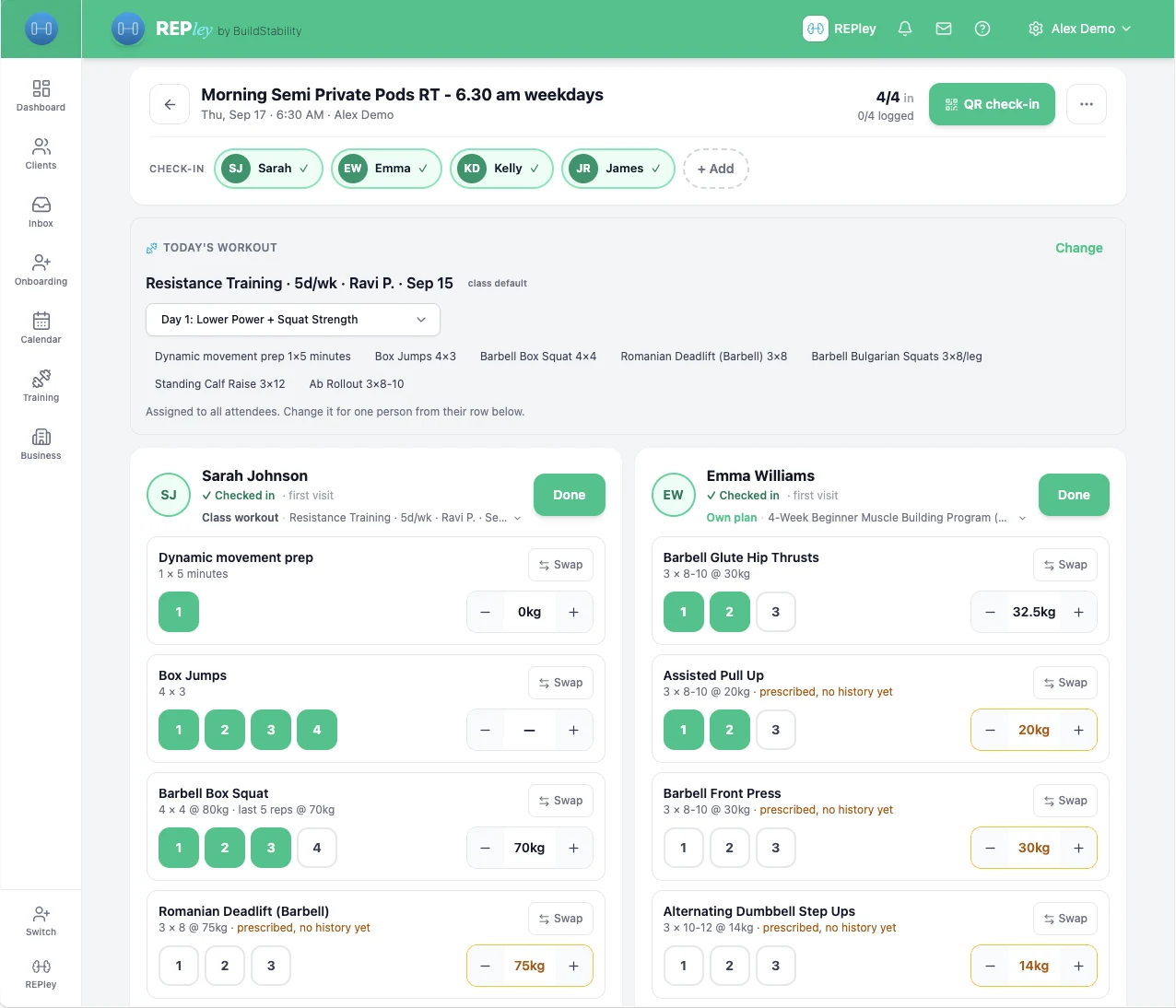
Semi-private and pods, made simple.
More clients per session, one-on-one attention. The Class Board runs the whole pod as easily as a 1-on-1: the waitlist fills the spots, QR check-in gets them in fast, and every set is logged on the iPad while they train.
- More clients per session, not more hours
A pod at pod rates beats one client at 1-on-1 rates, and the Class Board is why you can coach every one of them properly instead of chasing a clipboard.
- One board, everyone's plan
The class workout is attached to the session. Anyone who needs their own program is on it from their row. Six people, six programs, one screen.
- Full pod, QR check-in, billed once
The waitlist fills any spot that opens. QR check-in gets everyone in at the door in seconds. Packs and memberships deduct per visit. Set it up once.
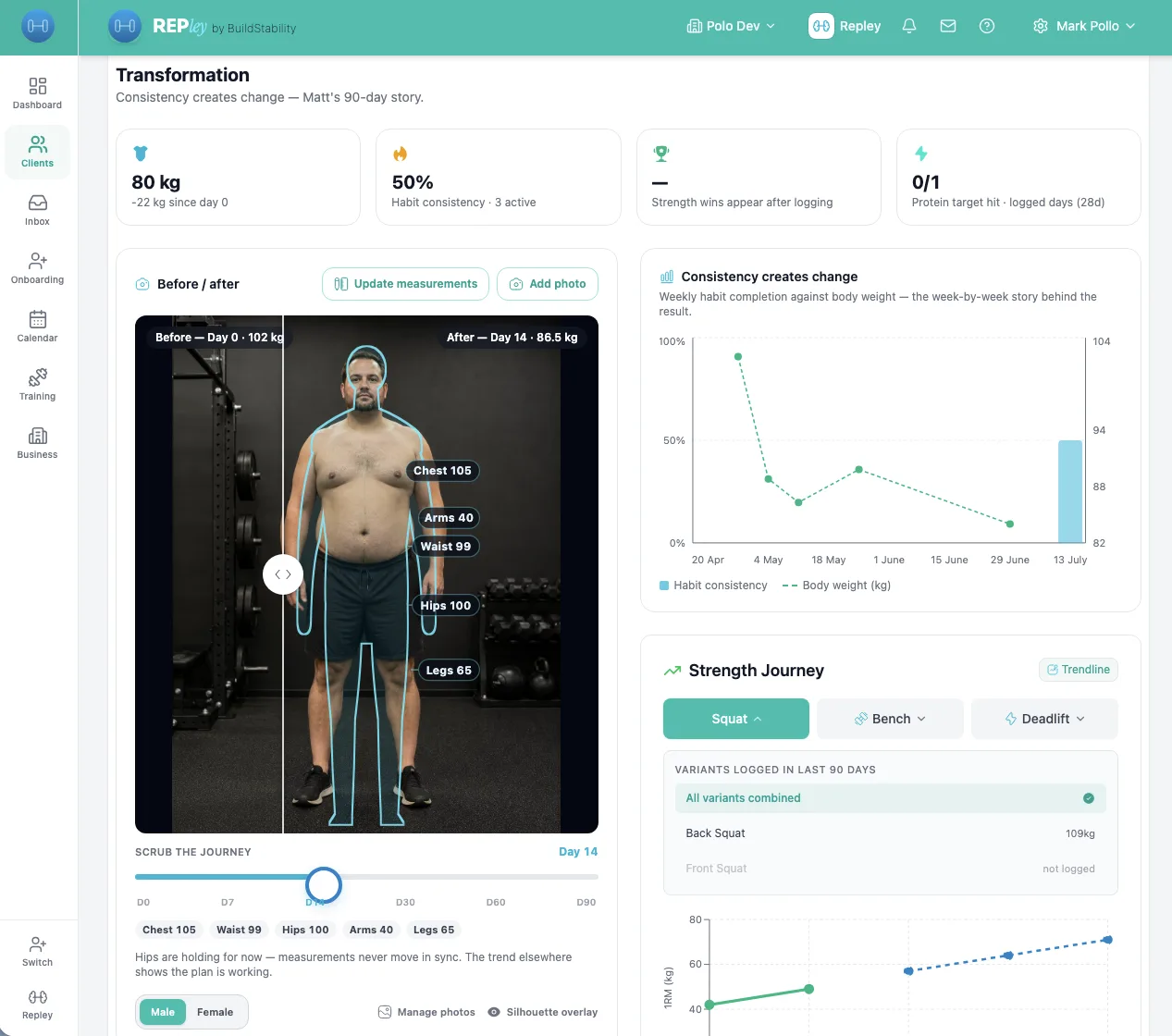
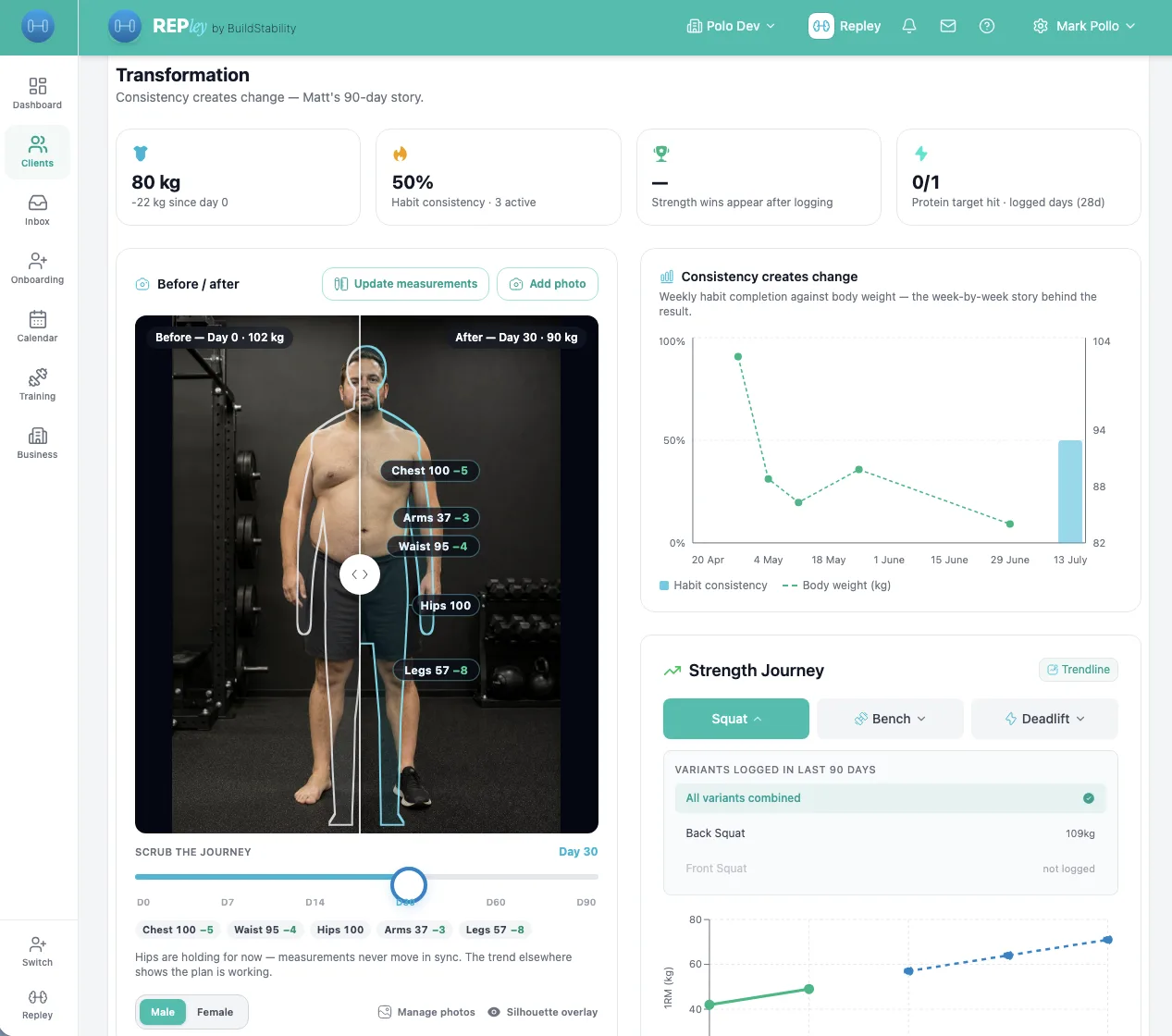
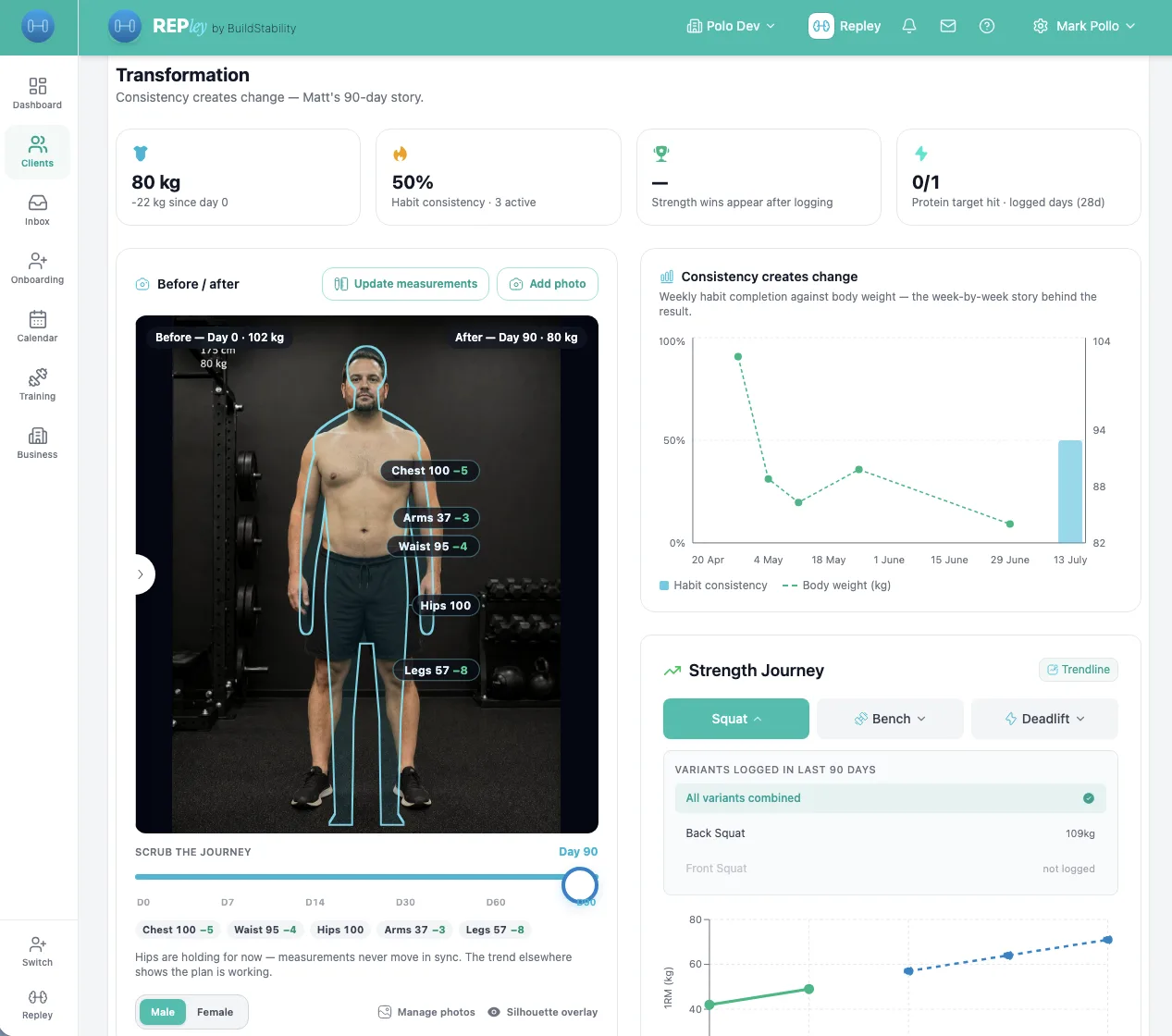
Show Clients the Change
The 90-day journey tracks the work. The Transformation page proves it: before/after photos, measurement deltas, strength trends, side by side.
- Day 0 in 30 seconds
Goal and starting weight by default. Optional toggles for 1RMs, body measurements, starting photo. Skip what doesn’t matter.
- Before/after built in
Photos side by side, measurement deltas, and a silhouette overlay for photo-shy clients. The client-facing polish big-box platforms charge hundreds a month for, on every plan here.
- Day 90 they share
The arc ends with a celebration page the client posts. Warm referrals without asking, and the natural moment to talk about the next 90 days.
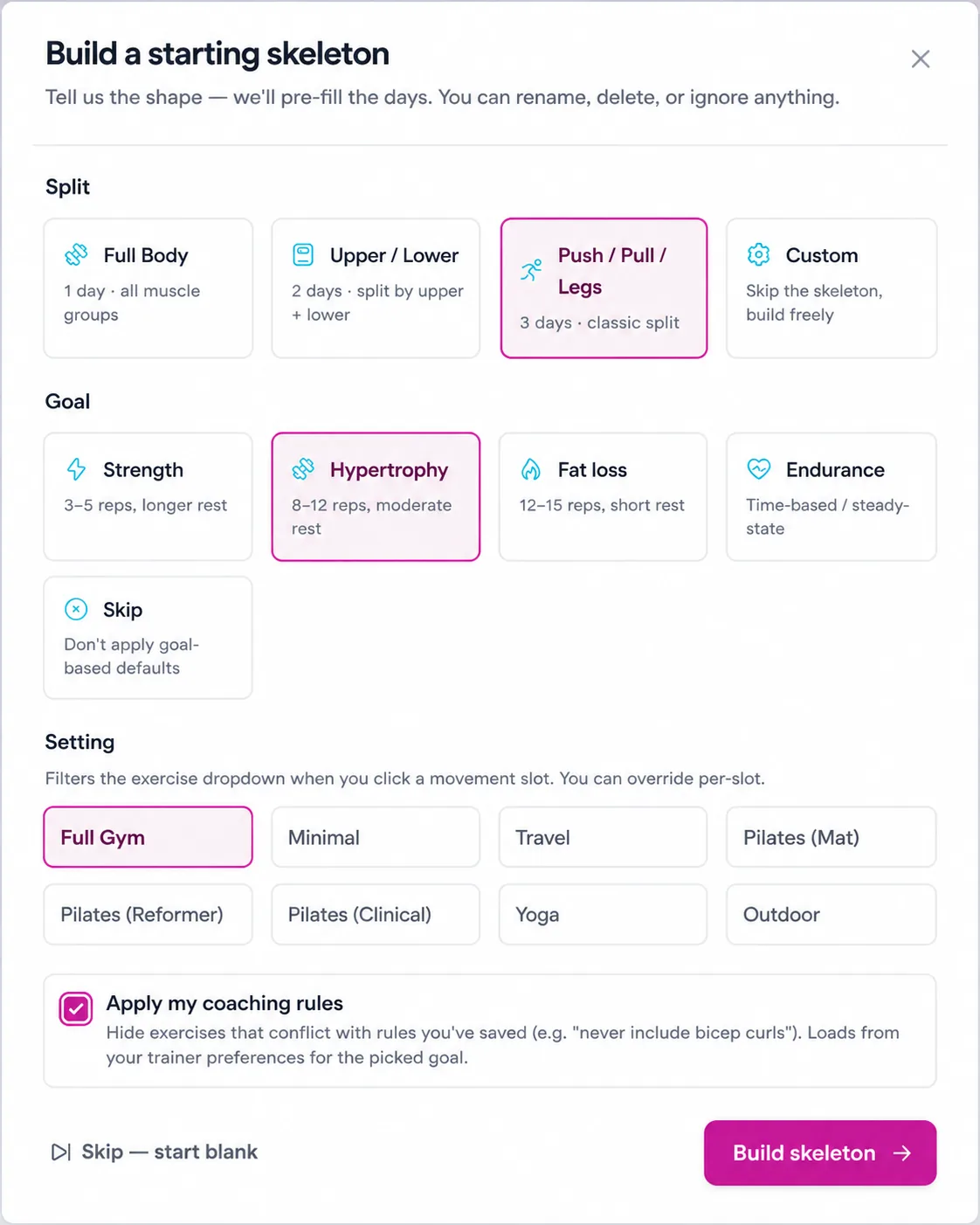
Manual Plan Building, Without the Manual Work
Three picks, pre-shaped grid, fill in seconds. For when your read of the client beats the data.
- Skeleton in three picks
Split, goal, equipment. The day grid arrives pre-shaped with movement-pattern slots. Push / Pull / Legs in one click.
- Prescription shorthand
3×8 @RPE8 90s parses straight into Sets, Reps, RPE, Rest. One keystroke instead of four dropdowns.
- Auto-saves every two seconds
Section headers (Strength, Accessories, Finisher) appear as you build. Never lose work to a closed tab.
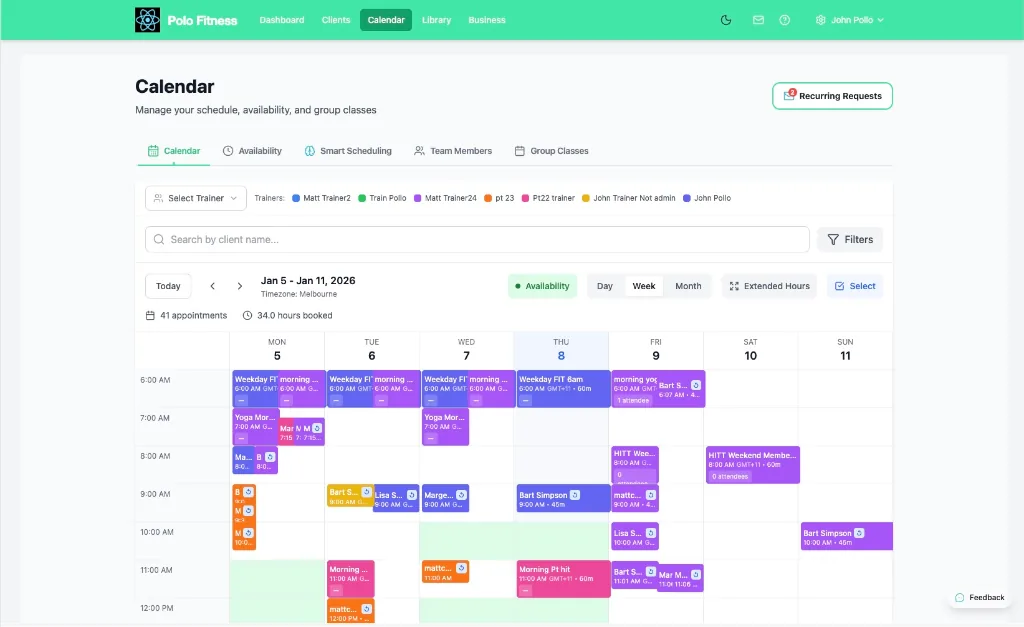
A Calendar That Actually Reads Your Studio
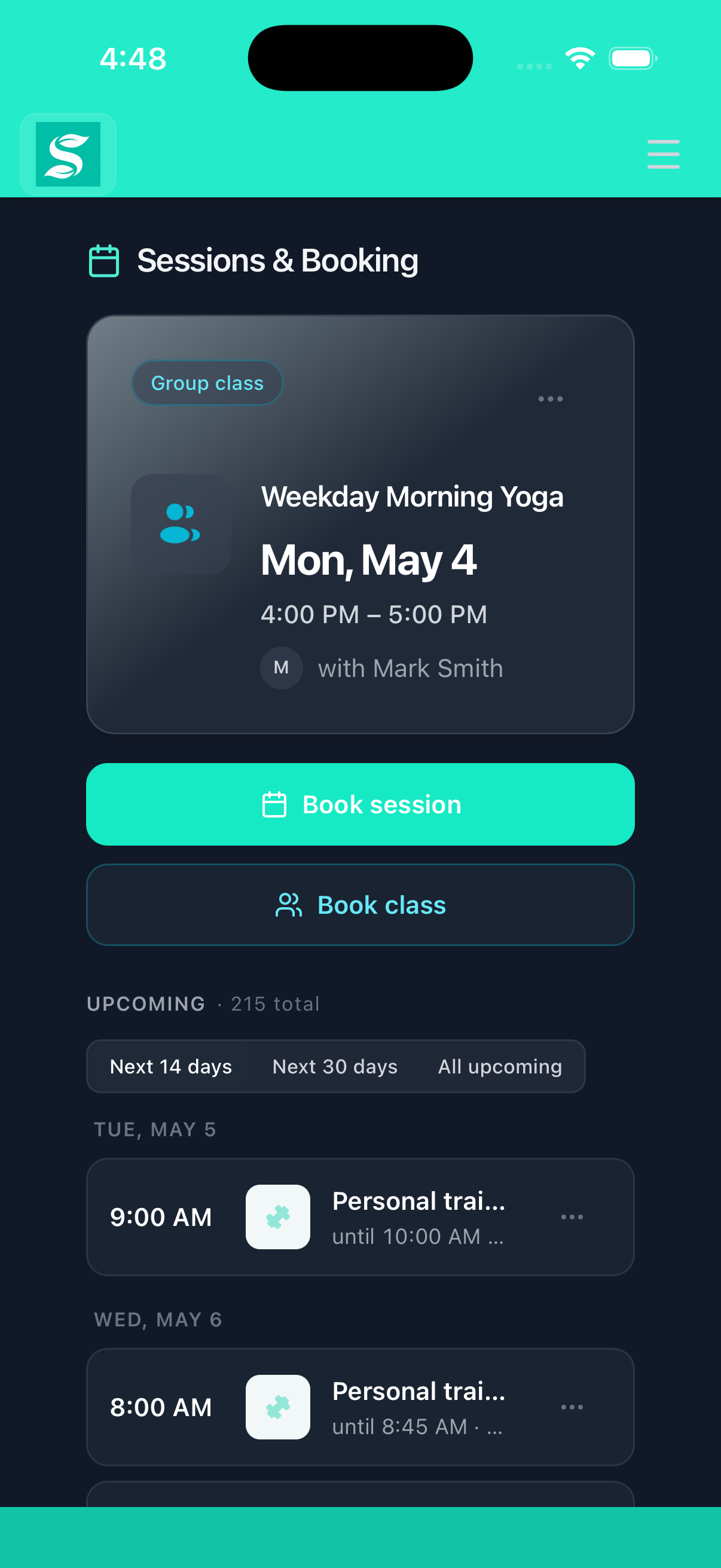
Group classes with capacity and waitlists. Privates. Drop-ins. Reformer reservations. Clients book on their phone. You teach. And it all lands in your Google Calendar, both ways.
- Every session type
Group classes, privates, drop-ins, reformer reservations. One calendar, every booking model your studio runs.
- Waitlist auto-promotion
The moment a seat opens, the next person is in. Confirmation goes out automatically. No staff in the loop.
- Google Calendar, both ways
Connect once. Sessions appear in your Google Calendar and move when you reschedule, and your own busy time for the next fortnight can close those slots here. All-day entries are ignored and blocking is a switch you control. We only read free or busy, never event details.
A Trainer That Learns How You Coach
Tell REPley your coaching preferences once. Every plan it builds follows them.
- Tell REPley once
"For HYROX never include bicep curls." Every plan from then on follows the rule. No re-typing the same constraints.
- Chat + Plan Builder
Rules apply in both surfaces. It doesn’t matter how you start a plan, your coaching style applies.
- Sport-scoped
HYROX rules stay out of strength plans. Strength rules stay out of running plans. No rule pollution between scopes.
Tell REPley once. Stops re-typing the same constraints every plan.
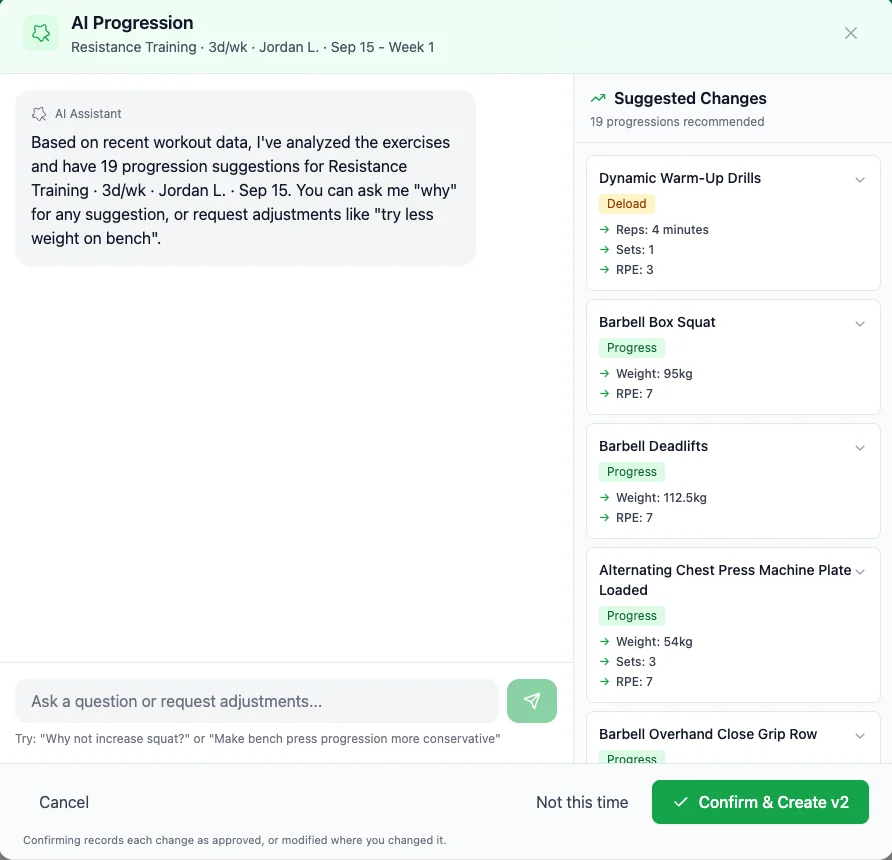
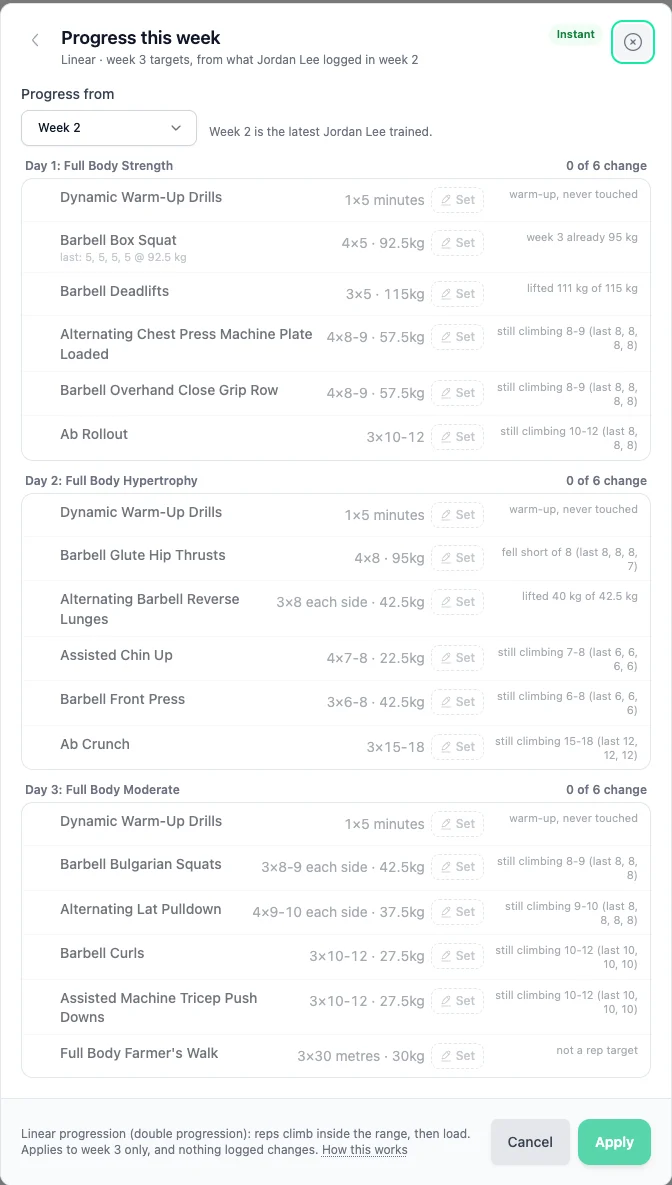
Progression Engine
Every client progresses every week, whether you had time or not. One tap on the gym floor, or hand the block to REPley.
- No client ever stalls
One tap writes next week from a rule that knows a barbell from a band. Done before they re-rack, so progression never waits for your Sunday.
- A second opinion when it matters
Hand the block to REPley when effort and notes say the plan needs a rethink. Ask why, push back, confirm. About 90 seconds.
- Nothing lands without you
Every change is previewed, any row can be overruled, the lot can be undone, and every version is kept. Fast never means automatic.
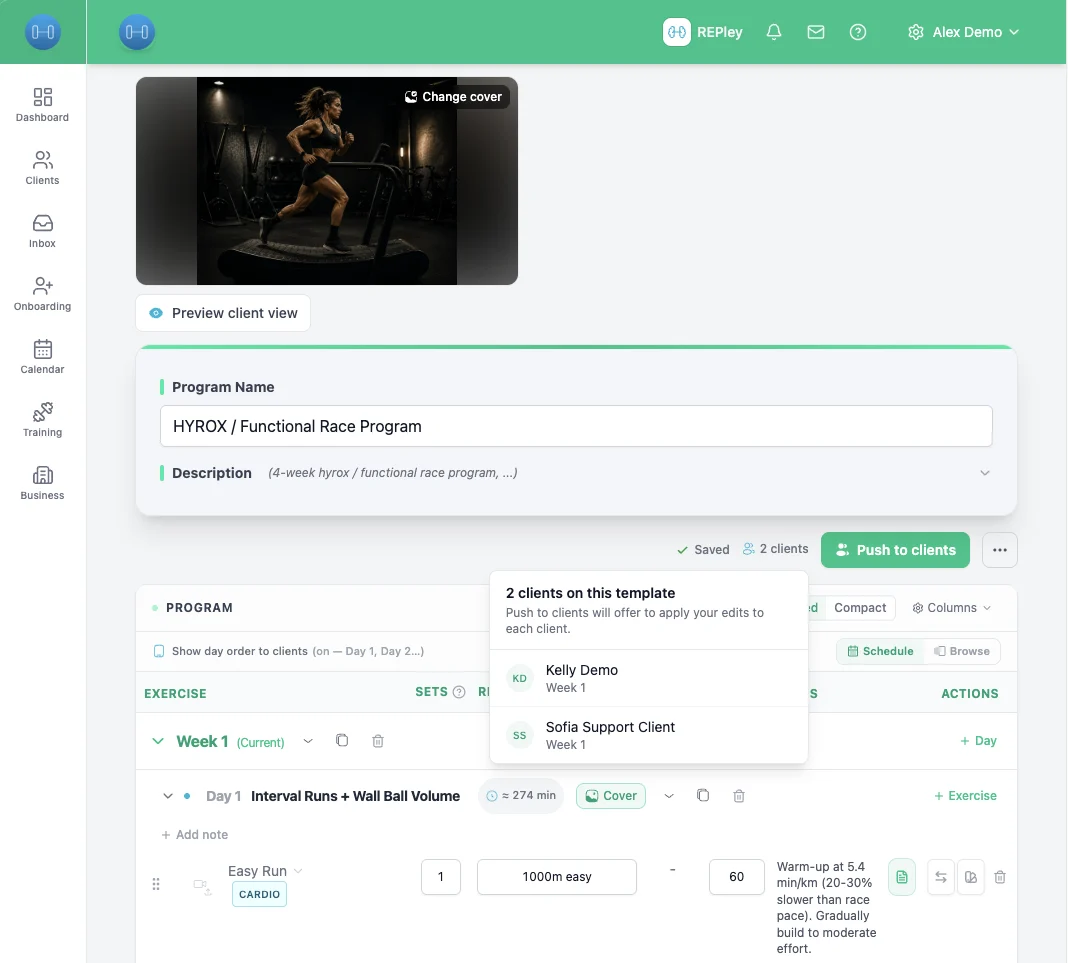
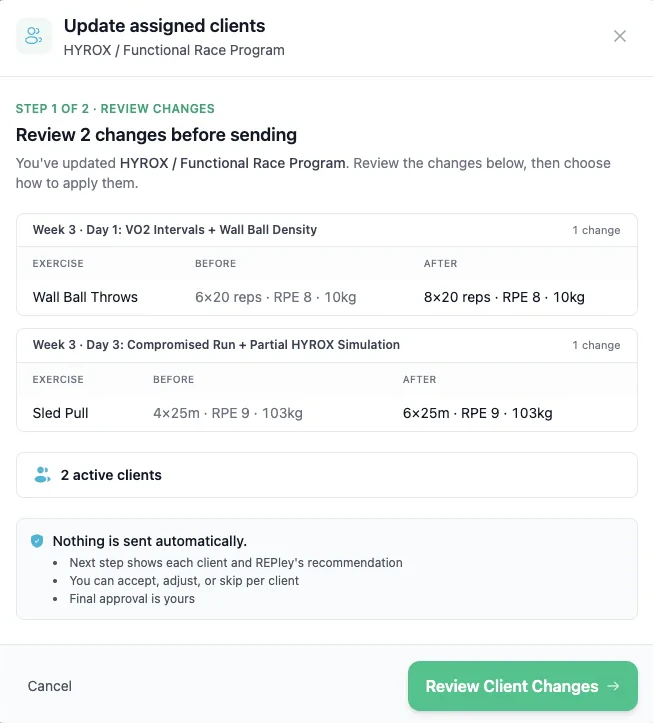
Edit the program. Forty plans update themselves.
Change the template once. Two screens later, every client has a version that fits them. No spreadsheet, no forty edits.
- Two screens, one decision
Step one shows what changed, before and after. Step two shows each client and what lands for them. Approve, and you are done.
- Fits each client on the way through
Holds for anyone in deload. Swaps a lift the gym does not have. Pauses on a flagged injury. Applies the rest without you touching them.
- Nothing is sent automatically
You see every client before anything writes, with REPley’s reasoning where it helped. Final approval is always yours.
Walk-Ins Without the Clipboard
iPad at the door. Members scan, walk-ins type a name. Done.
- iPad kiosk at the door
Self-service check-in. No trainer or front-desk needed. Staff get to coach instead of working a desk.
- Scoped per class
Each QR is tied to one specific session. Nobody can accidentally check in to the wrong class.
- Walk-ins in 3 seconds
Walk-in registration with just a name and email. No app download, no login friction, no clipboard.
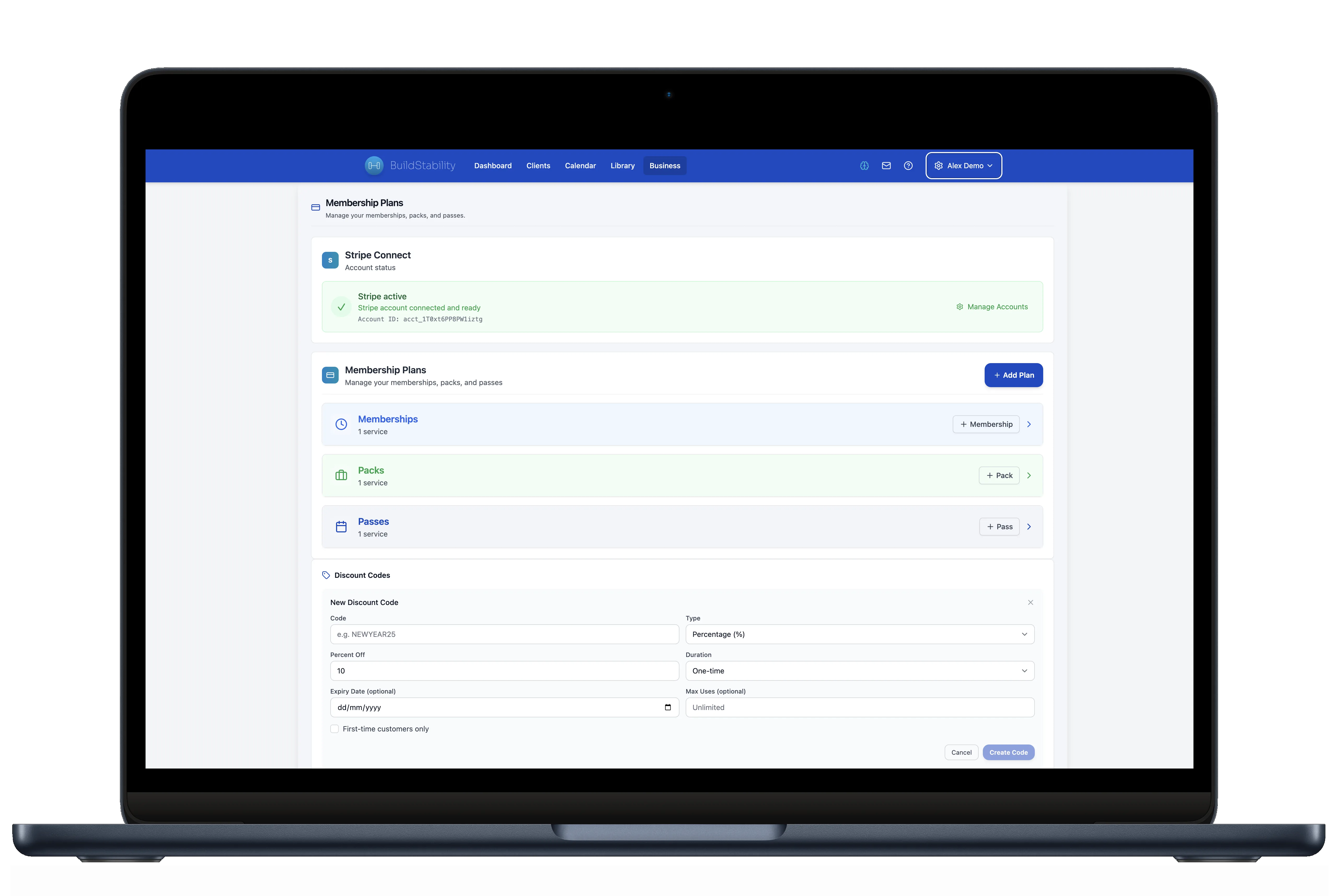
Money Shows Up. With a Receipt.
Stripe Connect. Zero commissions. GST-compliant invoices in your name.
- Every billing model
Class packs, memberships, one-offs, direct debit. One system, one dashboard, no juggling between Stripe links and spreadsheets.
- GST done right
Correct invoice whether you’re registered or not: GST with an ABN in Australia, GST with an IRD number in New Zealand, VAT with a VAT number in the UK, GST with a Business Number in Canada. Built by a CPA, not bolted on. BAS-ready exports in Australia. Canadian provincial HST is not applied yet.
- Zero commission
No per-booking fee. No percentage. Just Stripe’s standard card fee. The price on the page is the price on your bank statement.
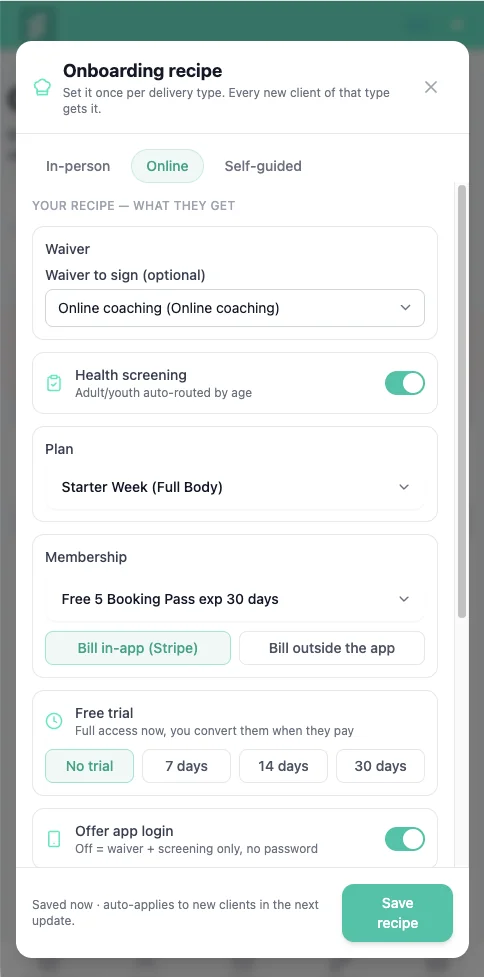
Take on online clients with one link, not an afternoon.
Every online sign-up used to cost you an afternoon of paperwork. Build the recipe once. New clients get the waiver, health screening, first plan and trial the moment they accept.
- Build it once per type
In-person, online or self-guided. Each recipe carries its own waiver, screening, first plan and membership. Set it, walk away.
- Fires when they accept
Waiver, screening, plan and trial all attach on accept. No intake to rebuild, no checklist to remember, no PDFs to chase.
- Screening for AU and NZ
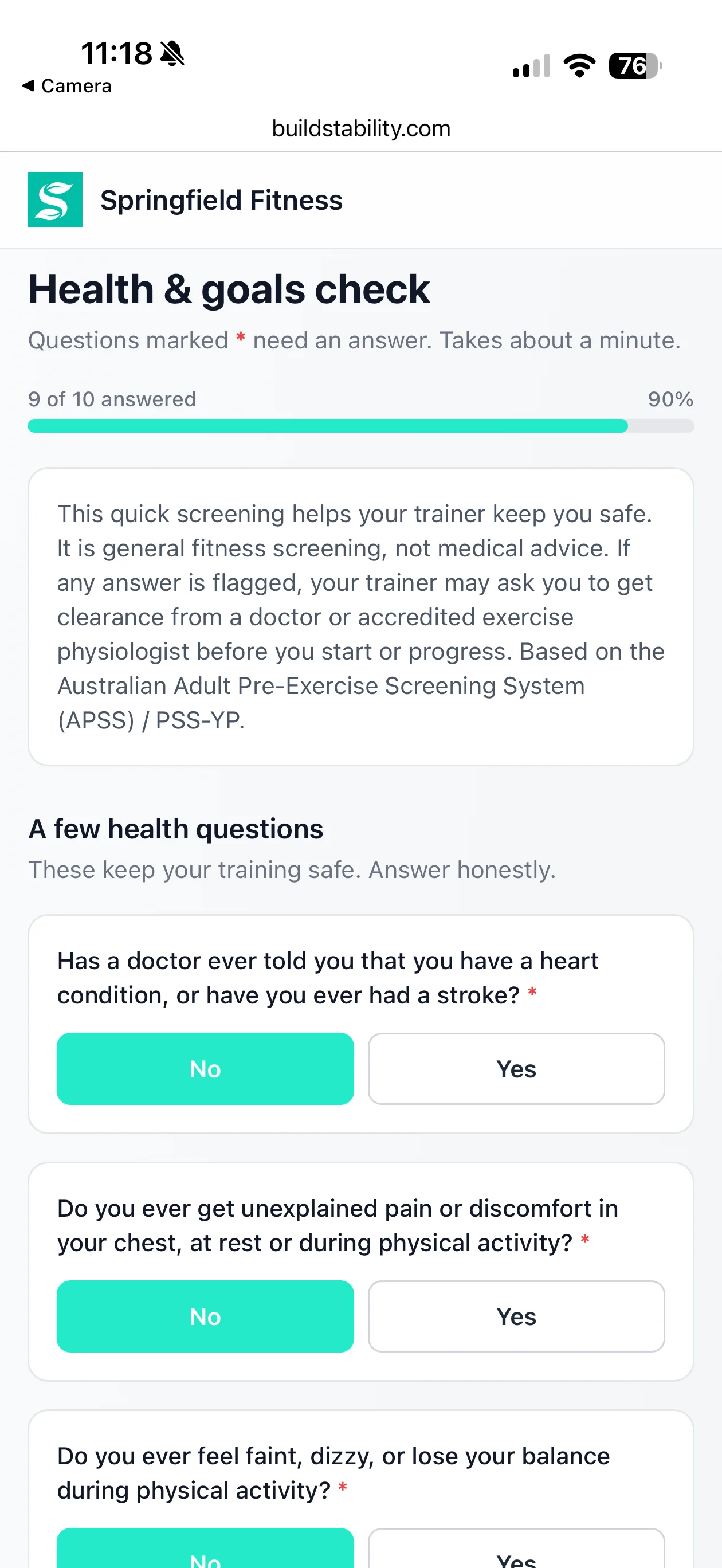
Age-routed pre-exercise screening flags health risks and recommends GP clearance. Built for the checks AU and NZ trainers run. Stay covered.
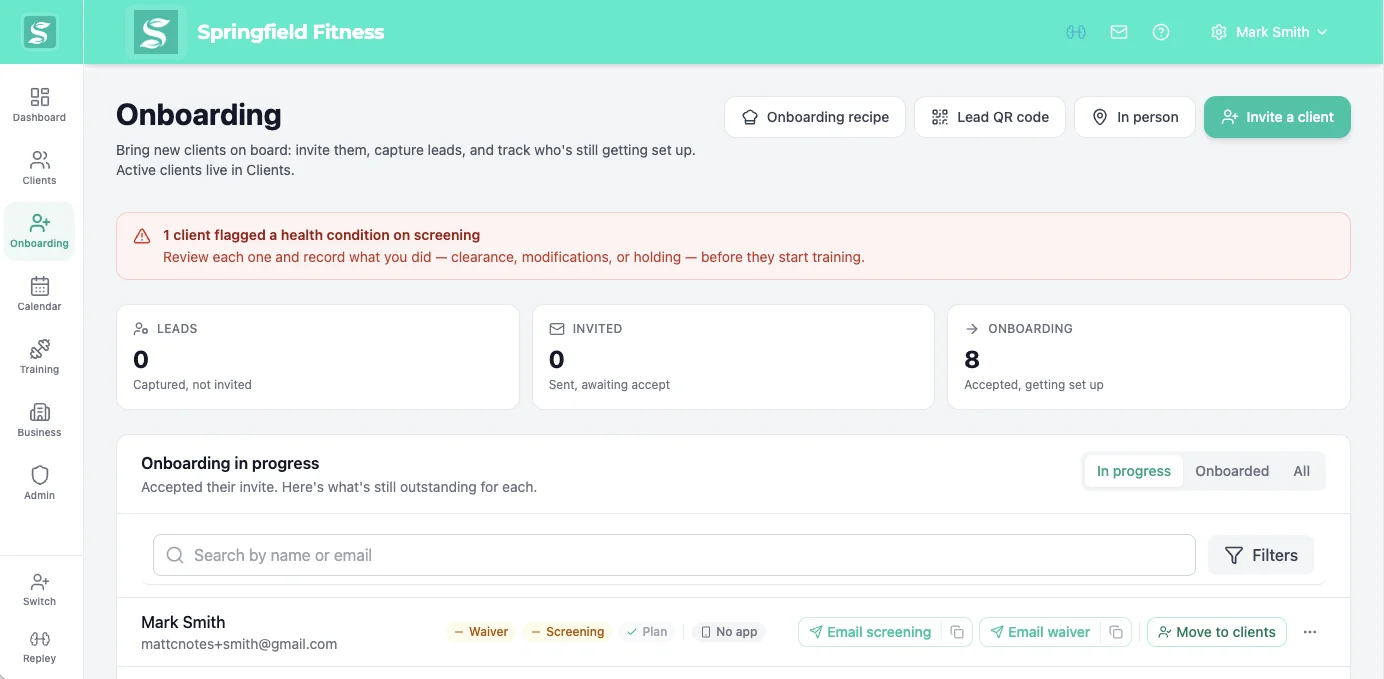
Onboarding that runs itself, so you can take on more.
The part of growing you keep putting off now sorts itself. Send one link and the waiver, screening and payment are handled, every client the same way.
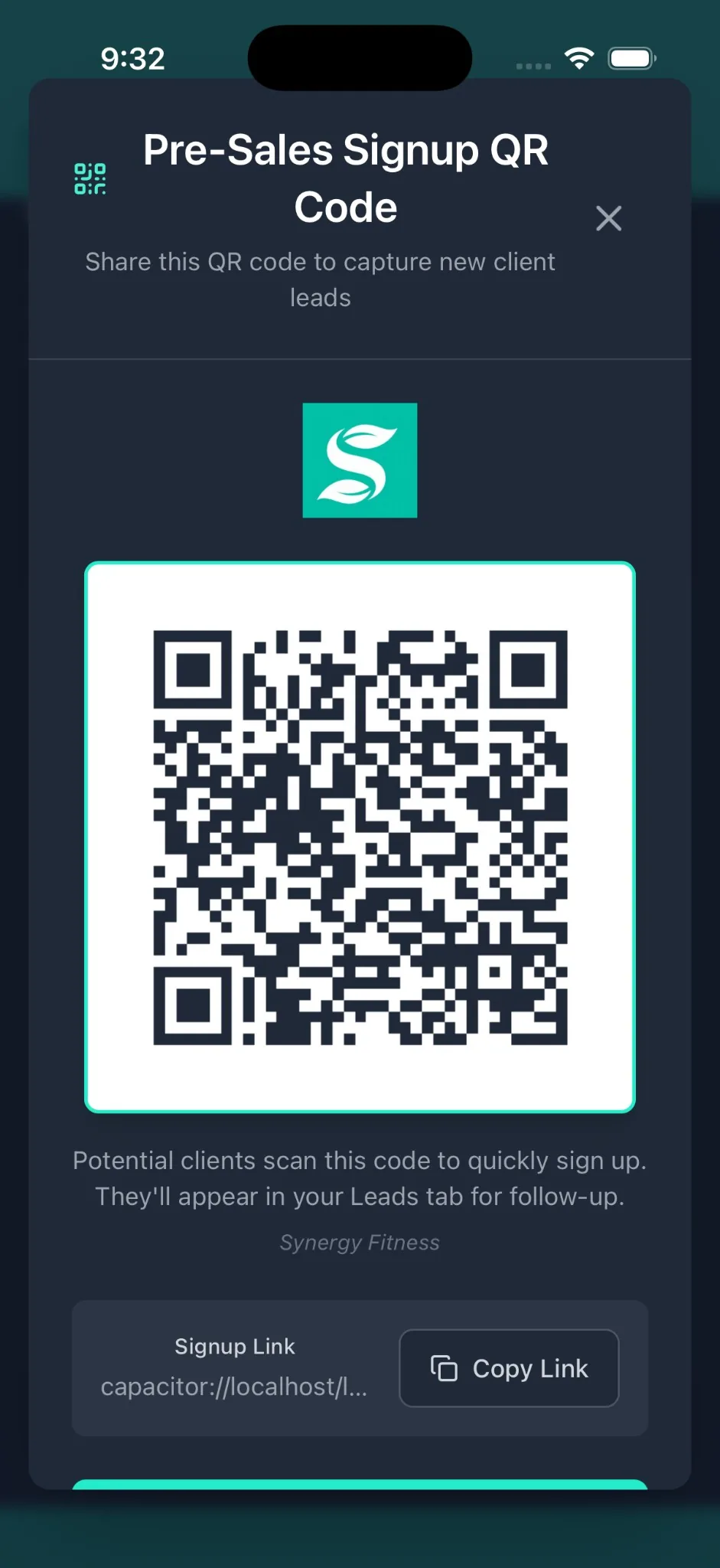
- One link, no app
They sign and screen from a phone or browser. Nothing to download, no password, the same for every client.
- Nothing slips through
Flag a condition on the AU and NZ screening and they wait in a review queue. You clear, modify or hold, on the record.
- Money arrives on its own
Near trial end they get a card link, add a card with no login, and billing starts. You never send the awkward text.
Show clients the change. Or watch them drift.
Six milestones per client, Day 0 to Day 90. Day 0 takes you 30 seconds. The logger and calendar fill in the rest.
- PRs fill in themselves. Lifts from the logger land on the right milestone.
- Before and after, built in. Photos, measurements, or a silhouette for photo-shy clients.
- Day 90 is shareable. Clients post it. You get referrals.
Twelve more tools. Every plan.
Nothing is held back for a higher tier. Plans differ only by how many clients you coach.
REPley Ride: indoor riding, free for your clients.
Clients ride VO2 max intervals, ERG workouts and real climbs on their own smart trainer, sized from their FTP. Every ride lands on their profile for you to see.
- Free for your active clients while you’re on REPley, on any plan.
- Works with most smart trainers: if it works with Zwift, it works here.
- Runs on a Mac, Windows or Linux computer.
See who’s about to quit
Engagement Score flags clients drifting on bookings, sessions and billing, about 30 days before they cancel.
Waitlists fill themselves
Someone cancels, the next person is booked and emailed. No 6am texts.
Your brand, not ours
Your logo and colours on the client app, booking page, invoices and emails.
No-show rules that enforce themselves
Set a warning and a block limit. Repeat no-shows are paused from booking for as long as you choose.
Waivers and intake forms, included
Digital waivers, custom forms and e-signatures on every plan. No add-on fee.
Add trainers without the chaos
Role-based access, a calendar per trainer and shared client notes.
Every client on one page
Contact details, workout history, billing, waivers and your notes in one profile.
206 exercises, ready to go
Tagged by muscle and equipment, with cues. Add your own exercises and videos.
Your data stays yours
Export everything, use the API, or connect Claude, ChatGPT or Gemini.
API & MCP docs →Specialist programs
Sprint, running, HYROX, hybrid and healthy ageing goals, each with its own programming rules.
Ask how the business is going
Ask REPley “how was March?” and get revenue, top services and retention in one answer.
The exit is as easy as the entry.
We never want to see you go. Life changes, and we hope it's that, not that the product let you down. Either way, cancellation isn't a fight. The PT software category has a cancellation problem: retention calls, support tickets, payment continues during the back-and-forth. We do the opposite, on the record.
Cancel in 1 click. Directly from the Business page. No support ticket. No phone call.
Keep access until the end of your billing period. No immediate lockouts. Export your data on your schedule.
Changed your mind? Undo in 1 click. Reverse a pending cancellation any time before it takes effect.
The questions trainers actually ask us.
Migration, data ownership, app requirements, the AI. If you have a different question, [email protected] reaches the team, not a queue.
Can I migrate from Mindbody, Trainerize, or TrueCoach?
Yes, and most of it you can do yourself, at your own pace. Import your client list from a CSV or a spreadsheet on the Clients page, and nobody is emailed until you invite them. Bring your programs across by adding the PDFs, photos or spreadsheets you have to the program importer, or paste a program you have as text into REPley. If you take payments through your own Stripe account, connect it and import your products, customers and active subscriptions. Need a hand? Email [email protected] and we will help.
Does this work for yoga studios, pilates, boxing, or martial arts?
Yes. Class-based businesses use QR check-in, class packs, memberships, and self-serve booking. Programs are optional. Yoga and pilates studios use it for reformer reservations and waitlist auto-promotion. Boxing, MMA, and BJJ gyms use it for class capacity, belt grading notes, and credit packs.
What happens to my data if I cancel?
You keep it. Export clients, bookings, programs, invoices, and session notes as CSV or JSON at any time, including after cancellation. We hold your data for 90 days as read-only in case you change your mind, then it is permanently deleted on request. No retention calls, no ransom on your own business data.
Do my clients need to download an app?
Only if you want them to. The client portal is a mobile-optimised web page that clients save to their home screen, so booking, payment, and program viewing works with no app install. The native iOS and Android apps are optional and open on your branding if clients want them.
Is the AI going to message my clients without me knowing?
No. REPley (the BuildStability AI assistant) drafts programs and flags at-risk clients for you to review. It never sends messages, invoices, or booking confirmations without your explicit approval. Every AI suggestion has a "confirm" step before anything reaches a client. You coach, REPley handles the admin.
How much does it actually cost for a studio my size?
Tiers are priced by active client count, not feature access. Every plan includes everything: AI programs, AI nutrition (AUSNUT + Aussie branded foods), scheduling, billing, waivers, branded portal, exports. Essential for small lists, Starter up to 25 active clients, Pro up to 100, Pro+ for 250+. Archive inactive clients to stop paying for people you are not training.
Get back to the part you love.
Every hour on admin is an hour you're not coaching. Start the trial, import your clients, and see what your week looks like without the spreadsheets.