AI Tools for Personal Trainers: The Next Wave Is Data-Driven
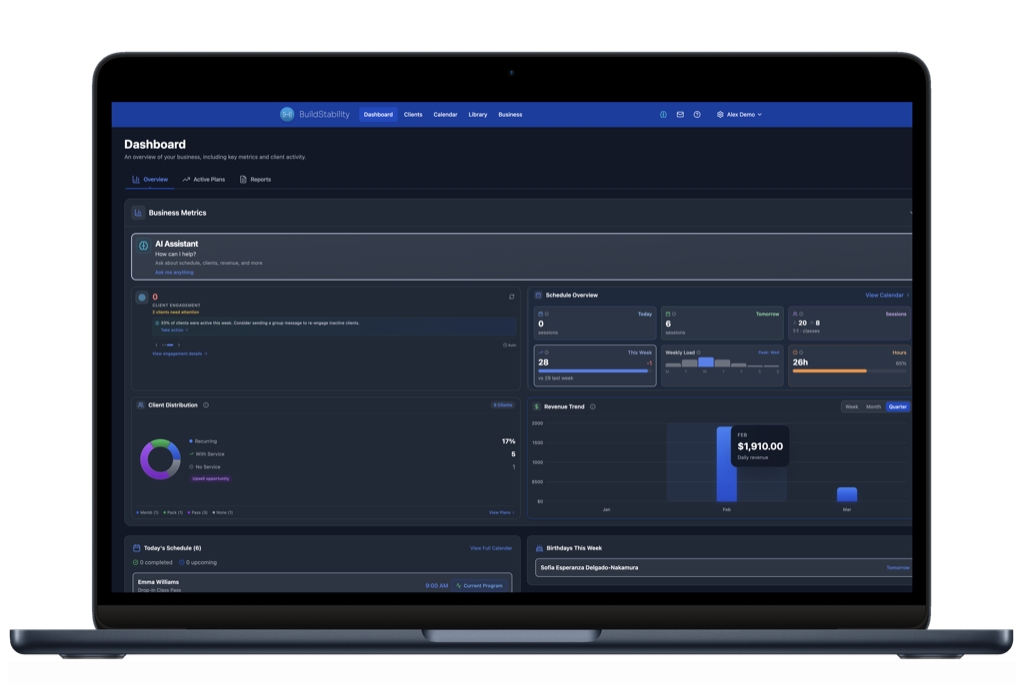
Apps like Fitbod and JEFIT prove clients want personalised programming, but they cannot replace a trainer who knows their injury history, reads their RPE, and adjusts on the fly. The trainers who win use AI for the boring stuff (program templates, admin, scheduling, engagement tracking) and bring their expertise where it actually matters. BuildStability gives you 25+ AI tools connected to your real client data so you spend less time on spreadsheets and more time coaching.
Your clients are already using AI trainers
Fitbod has logged over 2.8 billion lifting sets. JEFIT has 13 million users building their own programs from a library of 1,400+ exercises. These apps offer AI-driven progressive overload, recovery-based programming, and personalised workout plans. All for $8 to $10 a month. They are not coming for your job eventually. They are already training your clients on the days you are not there.
Here is the thing most trainers miss: that is not a threat. It is a signal. Clients want personalised, data-driven programming. They want progress tracking. They want things to feel tailored. Fitbod and JEFIT prove the demand exists. But these apps cannot do what you do. They do not know your client tore their rotator cuff in 2024. They cannot read that someone's RPE has been climbing for three weeks and needs a deload. They cannot look someone in the eye and say "something is off today, let's adjust."
Your expertise is irreplaceable for the parts that matter. The question is whether you are wasting that expertise on the parts that do not: the admin, the scheduling, the spreadsheet programming, the manual engagement tracking. That is where AI tools for trainers come in. Not to replace you. To handle the boring stuff so you can focus on what Fitbod and JEFIT will never be able to do.
A finance background changes how you see AI
Before building BuildStability, I spent 25 years building accounting and financial software for Australian businesses. I watched the first wave of AI arrive in financial services and learned something important about which tools actually last.
Some AI features were marketing. They sounded impressive in a pitch deck but did not change how anyone worked. Other AI features were genuinely transformative. The difference was always the same: the tools that lasted were connected to real data and delivered specific, actionable insights. Not generic outputs. Not things you could get from a Google search. Answers drawn from your own numbers, your own patterns, your own clients.
When I started building software for personal trainers, I saw the same pattern forming. Lots of AI that generates content. Very little AI that reads your business data, builds your programs, tracks your clients, and tells you what to do next. That gap is exactly what we built BuildStability to fill.
Two categories of AI tools (and both matter)
If you are a personal trainer evaluating AI tools, it helps to think in two categories.
Category 1: Generic AI tools. ChatGPT for writing captions and emails. Canva for social media graphics. Standalone AI workout generators for programming ideas. These are genuinely useful and worth exploring if you have not already. But here is the limitation: when you copy-paste client data into ChatGPT to build a program, it does not know your client's injury history. It does not track their RPE trends over the last six weeks. It does not remember that Sarah has a dodgy shoulder and Mark responds better to higher volume. You are starting from scratch every single time, and unless you have excellent spreadsheet skills, the context gets lost between sessions. It works. It is just slow, and the output is only as good as what you remember to paste in.
Category 2: AI connected to your real client data. This is the next wave, and it is where program building, exercise progression, scheduling, engagement tracking, and business intelligence all come together. Instead of copy-pasting into a generic chatbot, the AI already knows your clients. It reads their session history, tracks their injuries, monitors their RPE data, and generates programs that account for everything in their file. When Fitbod builds a workout, it uses population-level data from millions of anonymous users. When REPley builds one, it uses your client's actual data: the injuries you have logged, the session notes you have written, the progression patterns you have observed.
Both categories add value. But Category 2 is where your expertise gets amplified instead of replaced, and it is the reason a trainer with good AI tools will always outperform an app. Most trainers are up and running in under 10 minutes.
Want to see the difference? Try REPley with your own data.
What this looks like in practice: 25+ tools, all connected
Here is where I want to get specific, because most "AI tools" articles stop at five generic recommendations. BuildStability has 25+ AI tools live in the product today, all connected to your real business data. Here is what they actually do, grouped by how trainers use them day to day.
Programming and progression
This is where the Fitbod comparison gets interesting. These apps generate workouts from population data. REPley generates them from your client's actual history.
AI program builder. Describe what you want in plain English ("4-week hypertrophy block for an intermediate lifter, 4 days a week") and the AI generates a fully periodised program. But unlike a standalone generator, it knows your client. It factors in logged injuries, recent RPE trends, equipment access, and training history. You get a solid draft in seconds, then apply your expertise to fine-tune the parts that matter. The boring template work is handled. Your coaching eye does the rest.
Exercise progression. The AI analyses a client's workout history and suggests smart progressions: when to increase load, when to add volume, when to deload. Think of it as the data analysis that Fitbod does automatically, except your AI gives you the recommendation and lets you make the call. Your client gets the benefit of data-driven programming and a trainer who understands the context behind the numbers.
Program assignment and scheduling. Assign programs to clients with start dates, manage active programs, and let the AI handle the admin of program lifecycle. No more spreadsheet tracking of who is on which phase.
Client intelligence
Churn prediction. Your software already has attendance data, booking patterns, and cancellation rates. The AI reads these signals and flags clients whose engagement is dropping. Typically 30 days before they send the "I need a break" text. That early warning is the difference between a save and a loss.
Engagement scoring. Every client gets a score from 0 to 100, updated automatically based on session frequency, bookings, app activity, and cancellations. When a score drops below a threshold, you get flagged. The problem comes to you instead of hiding in a spreadsheet.
Client context and injury tracking. Save and retrieve client-specific notes: injury history, goals, preferences, limitations. The AI carries this context across every interaction. When you ask it to build a program or check on a client, it already knows the full picture. This is the gap ChatGPT will never close unless you paste everything in manually every time.
Client search and details. "Show me all clients who joined in the last 30 days." "Pull up Sarah's details." Filter and search your entire client base by name, status, join date, or engagement level. All in natural language.
Session management
Session briefs. Before your first client walks in, you know: Sarah's engagement dropped 40% this month. Mark mentioned lower back pain last session. Lisa cancelled her last two bookings. Context compiled automatically so you walk into every appointment prepared.
Session notes and tagging. Log notes during or after sessions with quick-tap tags for energy, mood, pain level, and RPE. The AI tracks patterns across sessions, so when you ask "how has Mark's RPE trended this month?" you get an actual answer, not a guess.
Exercise logging. View exercises for current sessions with completion status. Track what was done, what was skipped, and adjust future programming accordingly.
Scheduling and bookings
Smart scheduling. View your day, week, or specific dates. Reschedule or cancel appointments with natural language. "Move Sarah's Thursday session to Friday at 10am." The AI handles the admin, you handle the coaching.
Rebooking suggestions. The AI checks whether a client needs their next session booked and suggests optimal times based on their booking history and your availability.
Pending appointments and approvals. See all pending bookings and approve or decline them directly through the assistant. No more switching between tabs and calendars.
No-show tracking. Mark no-shows and track patterns per client. The AI maintains rolling no-show counts so you can spot problems early and have the conversation before it becomes a habit.
Business intelligence
Revenue intelligence. "How is revenue this month?" Plain English, straight answer. Up 12%. Down 8%. Two clients overdue. Daily, weekly, monthly, or yearly breakdowns. Instant, not something that requires exporting a CSV.
Business stats. Active clients, active programs, subscription tier, key metrics. All available in a single question.
Churn reports. Cancelled clients, revenue lost, retention rates by service type. The data you need for business decisions, delivered without a spreadsheet.
Billing and credit reports. MRR, subscription statuses, upcoming renewals, credit balances, expiring credits. Your financial dashboard, queryable in plain English.
Communication and preferences
Client messaging. Send emails to individual clients directly through the assistant. Draft a check-in, a program update, or a rebooking prompt without leaving the conversation.
Trainer preferences. Save your preferred communication style, coaching approach, favourite cues, and session brief format. The AI adapts to how you work, not the other way around.
See it in action
Here is the BuildStability AI assistant handling the kinds of questions trainers ask every day:
This is not a mockup. These are the same interactions trainers have with the assistant daily, asking plain English questions and getting answers drawn from their real client data. Notice how it pulls from real session history and injury notes without the trainer providing context each time.
Learn from Fitbod and JEFIT. Do not lose to them
Here is my take as someone who has studied how technology disrupts industries. Fitbod and JEFIT are not going away. They are getting better. Fitbod reports their algorithm has been trained on 2.8 billion sets of real lifting data, with users seeing 27% faster strength gains than those who program manually. JEFIT claims four separate AI engines analysing performance across 13 million users. These are serious products and they are priced at a fraction of what a single PT session costs.
But they all share the same fundamental limitation: they do not know the individual. They know populations. They know averages. They know what worked for millions of anonymous users. They do not know that your client's knee flares up on heavy squats, or that they are going through a divorce and their consistency has dropped, or that they respond better to RPE-based programming than percentage-based.
The trainers who will thrive are the ones who learn from what these apps do well (data-driven programming, progressive overload tracking, recovery management) and use AI tools to bring that same sophistication to their own practice. Not by competing with a $10/month app on price, but by combining their irreplaceable expertise with AI that handles the admin, builds the first draft, tracks the data, and flags the problems before they become cancellations.
That is the model we are building at BuildStability. Your expertise stays at the centre. The AI handles everything around it.
The tools that change how you coach
The tools above cover the big categories, but the ones that trainers tell us change their day-to-day are often the smaller, more specific ones. Here are a few worth calling out.
Block progression. This is the Fitbod killer. The AI analyses a client's workout history across training blocks and suggests when to progress load, add volume, or pull back for a deload. But unlike an app making decisions for your client, it gives you the recommendation and lets you make the call. You see the data. You apply the context. The client gets the best of both worlds.
Injury notes and client context. Every injury note, preference, limitation, and goal you log stays with the client permanently. When you ask the AI to build a program, suggest a rebooking, or generate a session brief, it pulls from that full history automatically. No re-entering data. No forgetting that Mark has a bad knee three months from now. This is the single biggest gap between generic AI tools and software that actually knows your clients.
Smart rebooking. The AI checks whether a client needs their next session booked, looks at their booking history and your availability, and suggests optimal times. For trainers with 20+ clients, this turns a 30-minute calendar juggle into a 30-second conversation.
Engagement insights. Beyond the raw engagement score, the AI generates specific recommendations for clients who need attention. Not just "this client is at risk" but "here is what to do about it." The kind of actionable follow-up that turns a data point into a retention save.
Credit and billing intelligence. "Which clients have expiring credits?" "What is my MRR this month?" "Show me upcoming renewals." Financial visibility that would normally require exporting to a spreadsheet, available instantly in plain English. Built by a CPA who thinks every trainer should have the same financial clarity that enterprise businesses take for granted. (Want the deeper accounting picture? Read our guide to GST, BAS and accounting software for Australian PTs.)
We are adding new tools regularly and every one follows the same principle: read the data, deliver something specific, save the trainer time. The roadmap is deep, but we would rather ship it than talk about it.
BuildStability includes all AI tools on every plan, starting at $19 AUD/month (plus standard Stripe processing fees on client payments). See pricing or start a free trial. Pricing current as of September 2026.
Frequently Asked Questions
What AI tools do personal trainers actually need?
Trainers benefit from two categories of AI: generic tools like ChatGPT (useful but you lose client context each session) and AI connected to your real client data (program builders, exercise progression, churn prediction, engagement scoring, scheduling, and revenue intelligence). The second category saves 5-9 hours of admin per week because the AI already knows your clients’ injuries, RPE trends, and session history.
Will apps like Fitbod and JEFIT replace personal trainers?
No, but they are raising client expectations. Fitbod uses 2.8 billion logged sets to generate workouts and JEFIT has 13 million users building their own programs. These apps excel at population-level data but cannot account for individual injury history, RPE context, or the nuanced coaching adjustments a trainer makes in real time. The trainers who thrive will use AI tools to match the data sophistication of these apps while bringing irreplaceable expertise to the parts that matter.
How is AI program building different from using ChatGPT?
When you copy-paste client info into ChatGPT, you start from scratch every time and the AI has no memory of injuries, RPE trends, or session history. An AI program builder connected to your PT software already knows the client. Their logged injuries, training history, equipment access, and progression patterns are all there. You get a solid first draft in seconds, then apply your coaching expertise to the fine-tuning.
How many AI tools does BuildStability include?
BuildStability includes 25+ AI tools across six categories: programming and progression (AI program builder, exercise progression, program assignment), client intelligence (churn prediction, engagement scoring, injury tracking, client search), session management (session briefs, notes, RPE tagging, exercise logging), scheduling (smart scheduling, rebooking, approvals, no-show tracking), business intelligence (revenue, billing, churn reports, credit tracking), and communication (client messaging, trainer preferences). All tools are included on every plan.
Ready to automate your training business?
Start your 14-day free trial. No credit card required.
Start Free Trial