An AI Assistant That Actually Saves You Time (Not Just Another Chatbot)
BuildStability's AI assistant connects to your real business data — schedule, clients, revenue, session history — and handles admin through conversation. Program generation, session notes, no-show tracking, and AI progression are included on every plan.
The Admin Trap
You didn't become a personal trainer to spend your evenings updating spreadsheets. But here you are.
Between chasing late payments, building next week's programs, replying to booking messages, and trying to remember who mentioned a sore shoulder on Friday, admin eats 5-9 hours a week. That's half a working day — every week — spent not coaching.
The worst part? Most of this work is repetitive. You're answering the same questions, looking up the same data, filling in the same fields. It's exactly the kind of work that should be automated.
What "AI" Usually Means in Fitness Software
Most fitness platforms added an AI chatbot in 2024-2025. Here is what that typically looks like:
- A generic FAQ bot that links you to help articles
- An "AI program generator" that produces the same template regardless of client history
- A chatbot that can answer "what is a superset?" but cannot tell you your revenue this month
These tools use the word "AI" for marketing. They do not actually reduce your admin time.
Meanwhile, apps like Fitbod (2.8 billion logged sets) and JEFIT (13 million users) prove that clients want data-driven, personalised programming. They are already training your clients on the days you are not there, for $8 to $10 a month. But those apps share a fundamental limitation: they know populations, not individuals. They do not know your client tore their rotator cuff last year. They cannot read that someone's RPE has been climbing for three weeks. They work from averages, not from the person standing in front of you.
That gap between generic AI and AI that actually knows your clients is where the real opportunity sits.
What BuildStability's AI Actually Does
REPley, BuildStability's AI assistant, is connected to your real business data. It reads your schedule, your clients, your revenue, and your session history to give you specific answers. When Fitbod builds a workout, it uses population-level data from millions of anonymous users. When REPley builds one, it uses your client's actual data: the injuries you have logged, the session notes you have written, the progression patterns you have observed.
Quick examples:
- "What's my schedule today?" → Your actual appointments with client names and times
- "Which clients are at risk of leaving?" → Ranked list with engagement scores and days inactive
- "What's my revenue this month?" → Real numbers from your billing data
- "Show me session notes for Sarah" → Last 5 sessions with RPE trends, energy patterns, and trainer notes
- "Who no-showed this week?" → Business-wide summary ranked by frequency
These aren't canned responses. They're live queries against your data, displayed as visual cards you can act on.
Each schedule card has inline action icons next to every client name — view today's exercises, check session history, reschedule, or mark a no-show — without leaving the chat. And a set of pinned suggestion chips ("Show my schedule", "Next appointment", "Message a client") are always visible so you build muscle memory for your most common actions.
Session Notes That Build Themselves
After every session, you have about 30 seconds before the next client walks in. That's not enough time for detailed notes in a spreadsheet. It is enough time for quick-tap tags.
BuildStability's post-session notes take under 15 seconds:
1. Tap energy level — Low, Medium, or High
2. Tap mood — Good, Okay, or Off
3. Tap pain status — None, Mild, or Flagged
4. Set RPE — 0-10 scale, one tap
5. Optional note — A sentence or two if needed
That's it. Five taps and you've captured meaningful session data.
Over time, these tags become powerful. The AI assistant tracks patterns across sessions. If Sarah has flagged pain in 3 of her last 5 sessions, you'll know. If Jake's energy has been consistently low, you'll see it. These are early signals that something needs attention — and you'll catch them before they become bigger problems.
You can also add notes through the AI chat. Tell it "Jake seemed tired today, mentioned his knee" and it automatically maps that to energy: low, pain: flagged, and saves it to his most recent session.
No-Shows That Handle Themselves
Every trainer has dealt with the no-show problem. The client doesn't show up, you lose the session, and you're left wondering whether to say something.
BuildStability automates the entire workflow:
1. Mark the no-show — One tap on the calendar, or tell the AI "mark Sarah's appointment as no-show"
2. Follow-up email sent — Automatic, with a tone that's firm but not punitive
3. Rolling count tracked — The system keeps a running total within a configurable window
4. Warning email at threshold — "You've missed X sessions in the last 30 days. Let's find times that work better."
5. Booking restriction if needed — After repeated no-shows, the client is temporarily blocked from self-serve booking
You configure the thresholds — warning at 2, block at 4, rolling window of 30 days, block duration of 7 days. Adjust them to match your business.
The AI assistant can answer questions about no-show patterns too. "Show me no-show stats for Lisa" returns her rolling count, total count, and whether she's currently blocked. "Which clients have no-showed recently?" gives you a business-wide summary.
Program Assignment Without Leaving the Chat
Assigning a program used to mean: navigate to the client, open the assign modal, pick a template, set a date, toggle an activation switch, and hope the API call worked. Now it's one sentence.
Tell the assistant "Assign a program to Sarah" and you'll see your program templates as tappable cards right in the chat. Tap one and it's assigned. The system figures out the rest:
- Start date is today or earlier? The program activates immediately and the old one is superseded.
- Start date is in the future? The program is scheduled as "Not Started" — ready to go when the time comes.
No toggle, no extra decisions. If you know exactly what you want, skip the widget entirely: "Put Sarah on the Upper Lower Split starting next Monday" handles everything in one shot.
This matters most on an iPad between sessions. You're not hunting through menus — you're telling the assistant what to do and moving on to your next client.
AI Program Generation
Building a program from scratch usually means an hour in a spreadsheet. With BuildStability, you tell the AI the client's goal, experience level, available equipment, and how many days they train. It generates a periodised program in under 60 seconds. When the block ends, the AI Progression Engine analyses real workout data and generates the next block with appropriate progressions.
This isn't a cookie-cutter template. The AI accounts for:
- Training split — upper/lower, push/pull/legs, full body, or custom
- Periodization — progressive overload structured across training blocks
- Exercise selection — matched to equipment availability and experience
- Warm-ups, rest periods, and tempo — filled in automatically
You review every exercise before the program reaches your client. Swap anything that doesn't fit. Adjust sets, reps, or load. The AI writes the first draft — you make it yours.
Some fitness platforms restrict AI program generation to their most expensive plan. BuildStability includes it on every tier.
End of Block: Keep The Momentum Going
Here's a common scenario: your client finishes a 4-week program. Now you need to build the next block. You open a spreadsheet, review what they did, figure out what to progress, and rebuild the plan.
BuildStability's "End of block" button handles this differently. It sits on the assigned program the whole way through, so you decide when the block is done rather than waiting on a completion percentage. Tap it, and REPley:
1. Reads what they actually logged — the last five sessions for each movement, the load lifted and the effort reported
2. Carries forward exercises — the ones that are working stay in the program
3. Progresses intelligently — increases load where RPE is consistently low, holds steady where it's high
4. Creates a new program version — the previous block is saved, not overwritten
The result is a continuation of the client's training, not a generic reset. And because it's a new version, you can compare side-by-side with the previous block to see exactly what changed.
You review the new block before it's assigned. Edit anything. Then apply it with one tap.
AI Progression Chat: Fine-Tune Exercises In A Conversation
Sometimes you don't need a whole new program. You need to adjust a few exercises based on how the client's been performing.
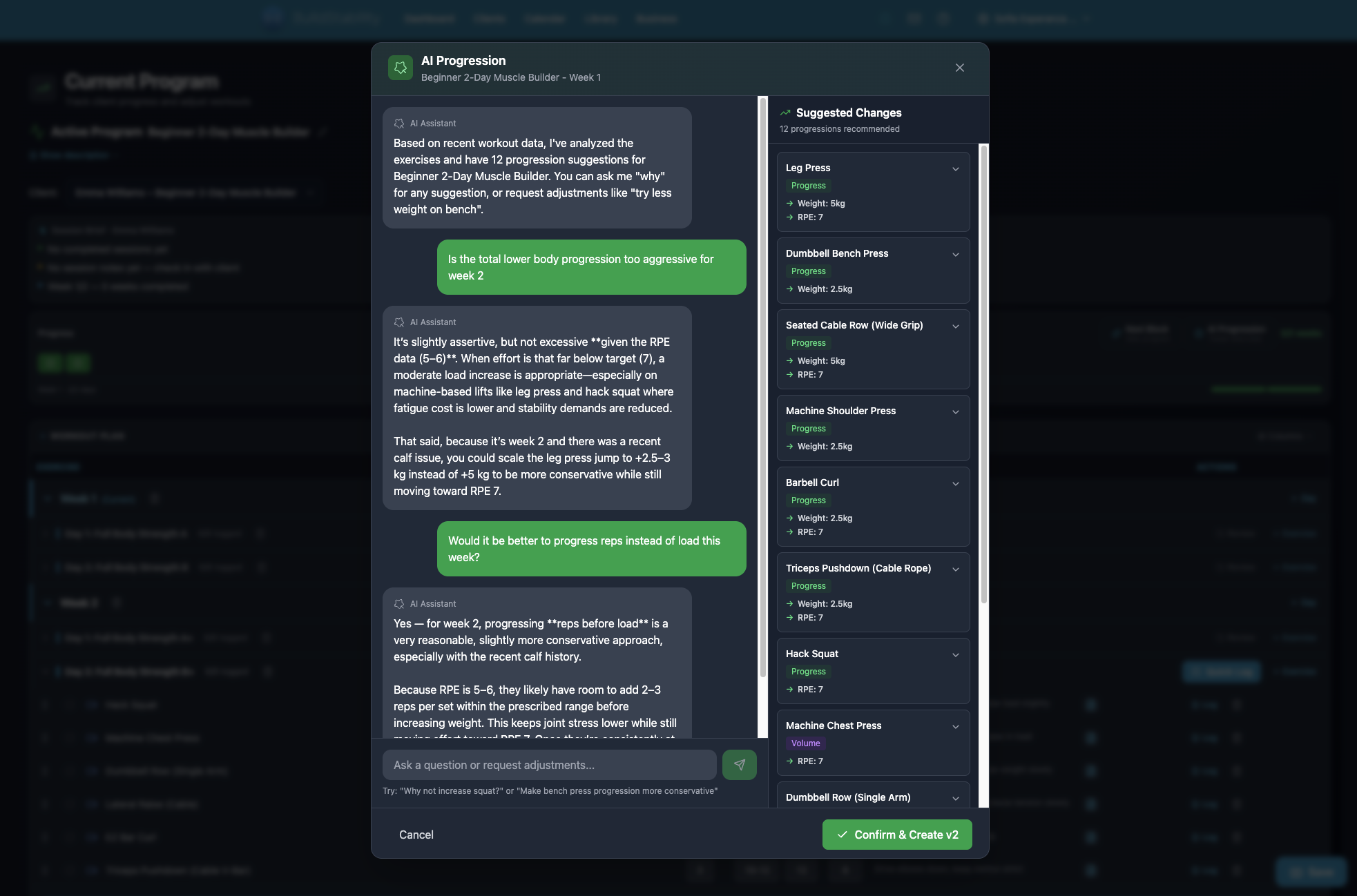
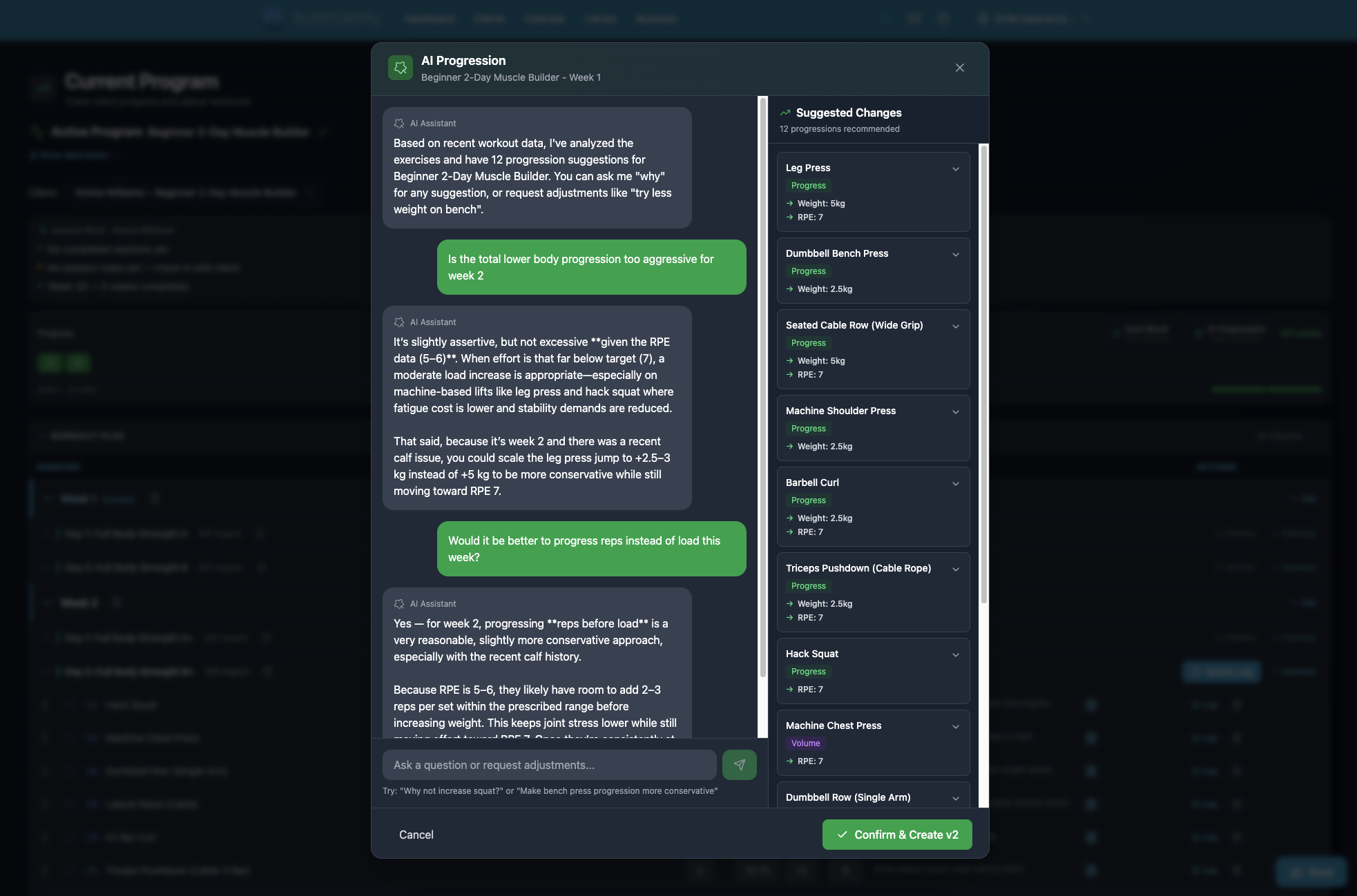
Open any assigned program and tap "Get AI Suggestions." The AI analyzes the last 5 sessions of logged data and suggests specific adjustments:
- Standard progression — increase weight when RPE has been consistently below target
- Deload recommendation — reduce volume or intensity when RPE is spiking
- Exercise swap — suggest alternatives when a client has plateaued or reports discomfort
- Volume adjustment — add or remove sets based on recovery and performance trends
Here's what makes this different from a one-way recommendation: it's a conversation. You can ask the AI why it suggested a deload. You can tell it about an injury that isn't in the data yet. You can say "swap the barbell bench for dumbbell" and it adjusts on the spot.
Every change creates a new program version. Nothing is lost. If the adjusted program doesn't work out, roll back to the previous version.
All Plans, All Features
Most fitness software gates AI behind a premium tier. Their AI program builder might require a $100+/month plan. Their progression tools — if they exist at all — cost extra.
BuildStability includes AI program generation, End of block continuation, and AI Progression Chat on every plan. Essential, Starter, Pro, and Pro+ all get the same core AI tools. The difference between tiers is client count and AI request limits, not whether you can use AI. Billing is included on every plan. You connect your own Stripe account with full dashboard control. We never touch your money and take zero commission. See current pricing.
We built it this way because AI progression isn't a premium add-on. It's the core of how modern program management should work.
The Difference: AI That Assists, Never Replaces
There is an important distinction between AI that automates decisions and AI that automates paperwork.
Apps like Fitbod and JEFIT prove that clients want data-driven programming. That demand is not going away. But those apps make decisions for your clients based on population averages. BuildStability makes decisions with you based on your client's real data. Your expertise stays at the centre. The AI handles everything around it.
BuildStability's AI handles the paperwork:
- Looking up data you would otherwise click through 3 pages to find
- Recording session notes you would otherwise forget
- Tracking no-show patterns you would otherwise manage in your head
- Generating program drafts you would otherwise build in Excel
- Analysing performance data you would otherwise calculate by hand
You still make every decision. The AI generates the program, you review and edit before assigning. The AI suggests a deload, you decide if the client actually needs one. The AI flags clients who need attention, you choose how to respond.
This is not about replacing trainer expertise. It is about freeing up the 5-9 hours a week you currently spend on admin so you can do more of what you are good at: coaching. The trainers who will thrive are the ones who use AI for the boring stuff and bring their expertise where it actually matters.
Getting Started
If you're already on BuildStability, REPley is available from your Dashboard. Open it and try:
- "What's my schedule today?"
- "Who needs attention?"
- "Add session notes for [client name]"
- "Assign a program to [client name]"
- "Generate a program for [client name]"
- "Show me no-show stats"
For AI Progression, open any assigned program and tap "Get AI Suggestions" to start a conversation about exercise adjustments. The "End of block" button sits on the assigned program throughout, so tap it whenever the block is done to generate their next training phase.
If you are evaluating fitness software, ask two questions: does the AI connect to real business data, and is it available on the plan you can actually afford? That is the difference between a tool that saves time and a marketing checkbox.
For a deeper look at how data-connected AI compares to generic tools like ChatGPT, and how apps like Fitbod and JEFIT are reshaping what clients expect, read our full breakdown: AI Tools for Personal Trainers: The Next Wave Is Data-Driven.
Ready to automate your training business?
Start your 14-day free trial. No credit card required.
Start Free Trial