Best Personal Trainer Scheduling Software (2026)

Judge personal trainer scheduling software on five things: client self-booking, whether it reads your real calendar, payment at the moment of booking, group capacity with a waitlist, and whether scheduling is in the plan price or an add-on on top. That last one is where a cheap-looking tool gets expensive: Trainerize puts full scheduling in a US$25/month Business add-on (verified 18 July 2026), and TrueCoach Payments takes a flat 5% of every client payment (8 September 2026). REPley by BuildStability includes scheduling, classes, billing and the AI assistant on every plan, with the tiers set by client count rather than by feature.
The short answer
The best personal trainer scheduling software is the one where a booking also knows the client, the pack they bought and the payment. Judge a shortlist on five things, and the last one catches people out more than the rest put together.
How to judge personal trainer scheduling software
Five criteria, in the order they tend to matter to a working trainer.
1. Client self-booking. Can a client book without messaging you? If not, you have bought a diary, not a booking system.
2. Conflict prevention. Does it read the calendar you actually live in, or only its own? A tool that cannot see your Tuesday will happily sell it twice.
3. Payment at booking. Does the booking know whether the client has paid, or are you cross-checking a spreadsheet?
4. Group and semi-private. Capacity, a waitlist that promotes itself, and the ability to run different programs inside one session.
5. What the price includes. Scheduling as standard, or scheduling as an add-on on top of the plan.
The shortlist
Everything below about another company comes from that company's own public pages, dated. Disclosure: this guide is published by BuildStability, which makes one of the options.
| Platform | Client self-booking | Payment at booking | Group capacity + waitlist | Scheduling included in the plan |
|---|---|---|---|---|
| Trainerize | Yes | Via a US$10/mo Stripe add-on | Capacity yes, waitlist not stated | No, Business add-on US$25/mo |
| TrueCoach | Not advertised for 1:1 | TrueCoach Payments, 5% per transaction | Not advertised | Plan-dependent |
| My PT Hub | Yes | Yes | Yes | Yes, from US$40/mo for 3 clients |
| PT Distinction | Not advertised with capacity + waitlist | Yes | Not advertised | Plan-dependent |
| REPley by BuildStability | Yes, with optional approval | Yes, no commissions | Yes, auto-promoting waitlist | Yes, on every plan |
| Generic schedulers (Acuity, SuperSaaS and similar) | Yes | Yes | Varies | Yes, but no training layer |
Verified from each vendor's own pages: Trainerize 18 July 2026, TrueCoach 18 July 2026 with its fee page rechecked 8 September, My PT Hub and PT Distinction 3 September. The generic-scheduler row describes the category, not either product's current plans. "Plan-dependent" means their public pages gave no single answer across tiers.
Trainerize is the strongest fit for asynchronous video coaching with a US client base, and its app ecosystem is the most mature here. The catch is the shape of the price: full scheduling is a US$25 a month add-on, client billing another US$10, and everything bills in US dollars. More detail.
TrueCoach is a clean programming tool with a scheduling gap: its public pages do not advertise client self-booking for one-to-ones, so the diary stays your job. Its payments product also takes a percentage, covered in the pricing section below. More detail.
My PT Hub includes scheduling and is the closest thing here to a like-for-like feature set. The friction is the plan ladder: Starter is US$40 a month for 3 clients, Premium US$105, Ultimate US$329, with five add-ons on top. More detail.
PT Distinction is a well-regarded programming platform whose public pages do not advertise client self-booking with capacity and waitlists. Belongs on your list if you book every client yourself, not if you want them booking themselves. More detail.
REPley by BuildStability puts the booking, the pack and the invoice on one record, so a booking deducts a credit and produces a compliant tax invoice without a second system. Scheduling, classes, billing and the AI assistant are on every plan; what it will not give you is your own App Store listing. See the features.
How to read the pricing
This is where a cheap-looking tool turns expensive.
Add-ons are the big one. A plan price that excludes the thing you came for is not the price. On Trainerize, scheduling is a US$25 a month add-on and client billing another US$10, so a two-client trainer who wants booking and payments pays US$44 a month, not the US$9 headline (trainerize.com/pricing, 18 July 2026). My PT Hub lists five add-ons of its own, from US$15 a month per extra trainer (3 September 2026).
Per-client tiers decide your real price. Almost everyone charges by client count, so the number that matters is the tier you will be on in a year. Check the jump between tiers before you sign: some ladders step gently, some double.
A percentage is different in kind from a monthly fee. A flat fee you can plan for. A percentage grows exactly as you succeed. TrueCoach Payments takes a flat 5% per transaction on the invoice total including tax (TrueCoach help centre, 8 September 2026): A$100 a month on A$2,000 of client payments, A$300 on A$6,000, for the same software.
Silence is not zero. Several platforms in this category publish no transaction fee anywhere on their public pages. That is not the same as charging none. If a platform will be routing your client payments and will not tell you what it takes, ask before you migrate and get the answer in writing.
Two more worth asking outright: can I connect my own Stripe account, and what does it cost to leave?
Where the author sits, since you should know: REPley has four tiers set by client count, with scheduling, classes, billing and the AI assistant on all four. No scheduling tier, no billing add-on, no commission. That is a claim about the shape of the pricing, not about being cheapest, and the table above is there so you can check it rather than take it from us. Prices are on the pricing page.
Is a free Google Calendar booking page enough?
Sometimes, and anyone who tells you otherwise is selling something.
A Google Calendar appointment schedule gives you a booking link that respects your availability, on an account you already have. Starting out with eight clients who pay by bank transfer, that is a good answer, and you should keep the money.
Three things end it, and the first is the one nobody warns you about.
Your booking link is a Gmail address. A client booking with [email protected] is being told something you did not mean to say. Looking like a business means a domain plus Google Workspace per user per month, and at that point free is not free, and what you bought is an email address rather than a booking system.
Payment at booking is not on the free tier. It needs a paid Workspace plan, Business Standard or above, with Stripe connected, and on every eligible edition except Business Standard the setting is off until you turn it on. Checked against Google's support documentation, 16 September 2026.
It does not know who the client is. No client record, no history, no injury note, no program on the session, and ten sessions bought in advance is a number in your head. No no-show tracking, no tax invoice, no waitlist, no capacity limit on a class.
Acuity, SuperSaaS and the rest of the generic schedulers hit the same wall. They are good products built for salons and clinics, where a time slot and a confirmation email is the whole job, and personal training has layers underneath that you end up bolting a separate tool onto one at a time.
The honest test: if you bill outside your booking tool and you like it that way, a free booking page is enough. The moment you are reconciling who has sessions left, chasing a no-show, or telling someone the 6am is full and you will let them know, you are doing by hand what software does while you sleep. That is also when a generic scheduler stops being cheaper than a tool built for client management.
Which ones sync with Google Calendar, and how
"Google Calendar sync" covers four different things, and the difference decides whether a client books over your dentist appointment.
- Sessions out. Do your booked sessions appear in your own calendar, and move when you reschedule?
- Availability in. Does it read your calendar and close those times to clients? This is the half that stops the double booking, and the half most tools skip.
- Private. Does it see your event titles, or only that you are busy?
- Whose calendar. With other trainers, can one person see everybody's sessions, or only their own?
| Platform | Sessions out | Availability in | Your details stay private | Whole team in one calendar |
|---|---|---|---|---|
| Trainerize | Yes, one-way, set up in the mobile app | Yes, one-way, up to 2 calendars | Yes, events show as busy | Not documented |
| TrueCoach | Not documented, Zapier only | Not documented | Not applicable | Not documented |
| My PT Hub | Yes, to Google, iCal or Outlook, direction not stated | Not documented | Not documented | Not documented |
| PT Distinction | Via Zapier | Via Zapier, needs its own Zap | Not applicable | Not documented |
| REPley by BuildStability | Yes, to a calendar it creates, moving and deleting with the session | Yes, next fortnight, all-day events ignored, switchable | Yes, free or busy only, never titles, guests or locations | Yes, an owner can mirror every trainer's sessions |
Verified from each vendor's own help centre or product page, 16 September 2026. "Not documented" means their public pages did not describe it, which is not proof it cannot be done.
Two things to weigh before you connect anything.
Check what it can see. Reading free/busy returns start and end times and nothing else, so the software knows the slot is gone and never learns why. Trainerize does this and so do we. Anything reading your full calendar can read the appointment you would rather not explain, which matters more the moment that calendar is shared.
A Zap is not an integration. Where Zapier is the only route you are buying a second subscription, wiring it yourself, and inheriting both services' API limits. It fails quietly too: you find out when a client books over a session.
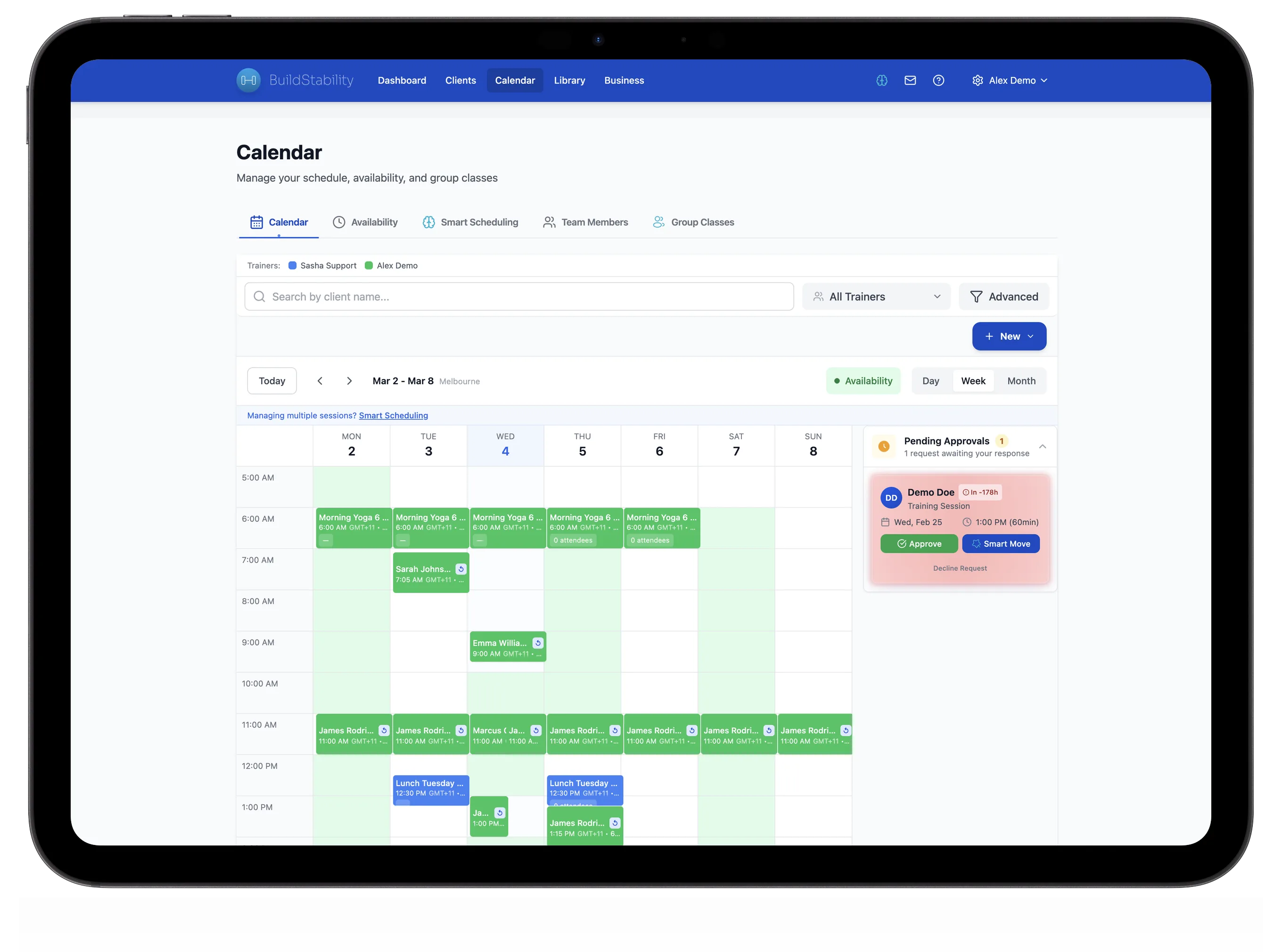
Nobody turns up, or too many do
Both cost you money and both are admin you should not be doing.
Nobody turns up. A cancelled seat should refill itself from a waitlist the moment it opens, and a repeat no-show should be counted rather than remembered. For a one-to-one, REPley drafts the reply with real times attached and you send it. What no-shows actually cost.
Too many turn up. Capacity has to be enforced when the booking is written, not checked afterwards, or you are turning someone away at the door.
Semi-private is where both bite hardest, and where revenue per session climbs. One Class Board runs the pod: QR check-in at the door, today's workout on the class, anyone on their own program from their row, billed once.
When another option is the better pick
Three cases where the answer is not us.
You coach asynchronously, mostly video, mostly US clients. Trainerize. Its app ecosystem is more mature and its whole shape is built around remote delivery rather than a diary.
The gym you work at already runs the booking. If you contract at a gym or studio that owns the timetable, those sessions are not yours to move, and running a second booking link for them just splits your diary in two. Keep their system for the floor. Get your own only when you have clients outside it, the online ones, the outdoor ones, and the ones who would follow you out the door, because those are the clients whose record you need to own.
You book every client yourself. PT Distinction and TrueCoach are serious programming platforms, and if nobody is self-booking, their scheduling gap costs you nothing.
So what should you choose?
Start with how you get paid, not with the calendar. If your clients buy packs or memberships, the booking and the payment need to live in the same record and most of the rest follows. If they pay you per session outside any software, a booking link is all you need and the honest answer is to spend the money elsewhere.
If the shortlist points our way, scheduling, classes, waitlists and billing are on every REPley plan. 14 days free, no card.
Competitor details in this guide are taken from each company's own public pricing and help pages on the dates stated, and are re-checked quarterly. Trainerize, TrueCoach, My PT Hub, PT Distinction, Acuity Scheduling, SuperSaaS and Google Calendar are trademarks of their respective owners. BuildStability is not affiliated with, endorsed by, or sponsored by any of them.
REPley by BuildStability includes self-serve booking, waitlists, QR check-in, Google Calendar sync and Stripe billing on every plan. Cancel in one click and keep access to the end of your billing period: see fair cancellation.
Frequently Asked Questions
What is the best scheduling software for personal trainers?
The best personal trainer scheduling software connects each booking to the client record, the pack or membership they bought, and the payment, so a reschedule does not create work everywhere else. Judge a shortlist on five things: client self-booking, conflict prevention against your real calendar, payment at the moment of booking, group and semi-private capacity with a waitlist, and whether the price includes scheduling or charges for it separately.
Does Trainerize include scheduling?
Basic scheduling yes, full scheduling no. Trainerize puts full scheduling, prospect booking pages and automated reminders in its Business add-on at US$25/month on Grow and Pro plans, on top of the plan price, and bills in USD. Verified at trainerize.com/pricing on 18 July 2026.
Is Google Calendar enough for booking personal training sessions?
For a handful of clients who pay you outside the app, often yes. A Google Calendar appointment schedule gives you a booking link that respects your availability, for free. What it cannot do is take payment at booking unless you are on an eligible paid plan (Business Standard, Business Plus, Enterprise Standard or Plus, Education, Nonprofits or Workspace Individual), and even then it has no client record, no session packs, no no-show tracking, no tax invoice and no waitlist. Checked against Google support documentation on 16 September 2026.
Which personal trainer platforms charge extra for scheduling?
Read the add-on list, not the plan price. Trainerize sells full scheduling, prospect booking pages and automated reminders as a Business add-on at US$25/month, with client billing a further US$10/month, so a two-client trainer who wants booking and payments pays US$44/month rather than the US$9 headline (18 July 2026). My PT Hub lists five add-ons including US$18/month for AI check-ins and US$15/month per extra trainer (3 September 2026). REPley by BuildStability has no add-ons: every plan carries scheduling, classes, billing and the AI assistant.
Do any personal trainer platforms take a percentage of client payments?
Some do, and a percentage is different in kind from a monthly fee because it grows as you succeed. TrueCoach Payments describes a flat 5% fee per transaction on the invoice total including tax, with the same 5% again on a refund and a US$15 chargeback fee, and states you cannot connect an existing Stripe account (TrueCoach help centre, checked 8 September 2026). Others publish nothing, which is not the same as zero. REPley takes no commission: clients pay into your own Stripe account and you pay Stripe directly, 1.7% + A$0.30 on an Australian card, dropping to 1.65% + A$0.30 on 1 October 2026.
Can clients book their own sessions?
Not on every platform. As of the September 2026 check, TrueCoach and PT Distinction do not advertise client self-booking with capacity and waitlists on their public product pages. In REPley you set your bookable hours once, clients book inside them from their phone, and you choose whether a booking confirms instantly or waits for your approval.
Does scheduling software stop double bookings with my own calendar?
Only if it reads your calendar, and it is worth asking what a platform means by that. REPley connects to Google Calendar and reads free or busy on your primary calendar for the next fortnight, so your own commitments can close those times on your booking link. All-day entries are ignored, because a birthday should not empty your day. You can also turn blocking off and keep only the view. It is not two-way editing of your Google events.
Which scheduling software handles semi-private and small group sessions?
Look for capacity limits, an automatic waitlist and per-attendee programming, which is the combination most tools miss. REPley runs a pod from one Class Board: the waitlist promotes the next person the moment a spot opens, QR check-in handles the door, and anyone who needs their own program is on it from their row while everyone else stays on the class workout. The pack is billed once.
How much does personal trainer scheduling software cost?
The list price is rarely the real price, because almost every platform charges by client count and several sell scheduling as an add-on. Work out the tier you will be on in twelve months, then add the add-ons you actually need. REPley has four tiers by client count, 6, 25, 100 and 250, with scheduling, classes, billing and the AI assistant on all four, so the only thing that moves is how many clients you carry. Prices are set in your own currency rather than converted at checkout, and the current figures are on the pricing page.
When is another platform the better choice?
Three common cases. If you coach asynchronously by video to a mostly US client base, Trainerize is the stronger fit and its app ecosystem is more mature. If you contract at a gym that owns the timetable, those sessions are not yours to move, so keep the gym's system for the floor and only get your own once you have clients outside it. And if you book every client yourself and want the deepest programming tool, PT Distinction and TrueCoach lose nothing by not offering self-booking.
Does personal trainer scheduling software work outside Australia?
REPley does. Prices are set in Australian, New Zealand, Canadian, British, euro and US currency rather than converted from one, and client payments run through your own Stripe account and pay out in your own currency. Tax invoicing is built per country rather than one template with the label swapped: compliant tax invoices in Australia and New Zealand, VAT in the UK and GST in Canada, with US sales tax left to you because it is set state by state.
Do I need scheduling software with only a few clients?
Probably not. If a free booking page and a payment link cover you, keep it simple and spend the money on something that grows the business. The switch tends to pay for itself once you are running recurring clients, more than one service type, or group sessions, because that is the point where the diary starts generating admin instead of just holding appointments.
Ready to automate your training business?
Start your 14-day free trial. No credit card required.
Start Free Trial